The player editor: an in-game character creator
A drop-in character creator for games and apps: an in-game editor where players change their Xbox 360 avatar inside your game. The game opens it, feeds it input, draws it, and gets a finished avatar (a 1,000-byte manifest) back, or a cancel. The full editor is 360sona.com's editor without the site's extras: Body, Appearance and Wardrobe, listing what the site lists. There is also a quick creator (eight generated looks, then one screen of quick changes) and a wardrobe-only picker. It is played with a gamepad first, and also with touch, a mouse and a keyboard. It takes the host game's colours, font, corner radius, scale and sounds, and it tells the host's screen reader what every control is.
It is an optional module, like sona_track: its own header (include/sona_editor.h), its own library
(libsona_editor.a, libsona_editor.so, sona_editor.dll). It links the core through sona.h like any app, so the core does not grow.
The quick creator and the wardrobe picker also exist as core screens that hand the host their layout to draw in its own UI; Quick creator and wardrobe says which to use when.
Every language reaches it. C and C++ call sona_editor.h. Rust has the sona-editor crate (sona_editor::Editor),
a safe wrapper on sona360 over the raw sona-editor-sys; both are in the SDK download (bindings/rust/sona-editor
and bindings/rust/sona-editor-sys, added by path; they are not on crates.io). The C# binding (SonaEditor) and the
Python one (sona.editor.Editor) wrap opening, input, the screens, the result and the UI layer, which they hand over
as RGBA pixels or a triangle list; they have no call that draws the avatar itself, which C, C++ and Rust draw with
sona_editor_draw (Editor::draw in Rust). Unity, Godot and Unreal have
components of their own (the engine reference).
Screens
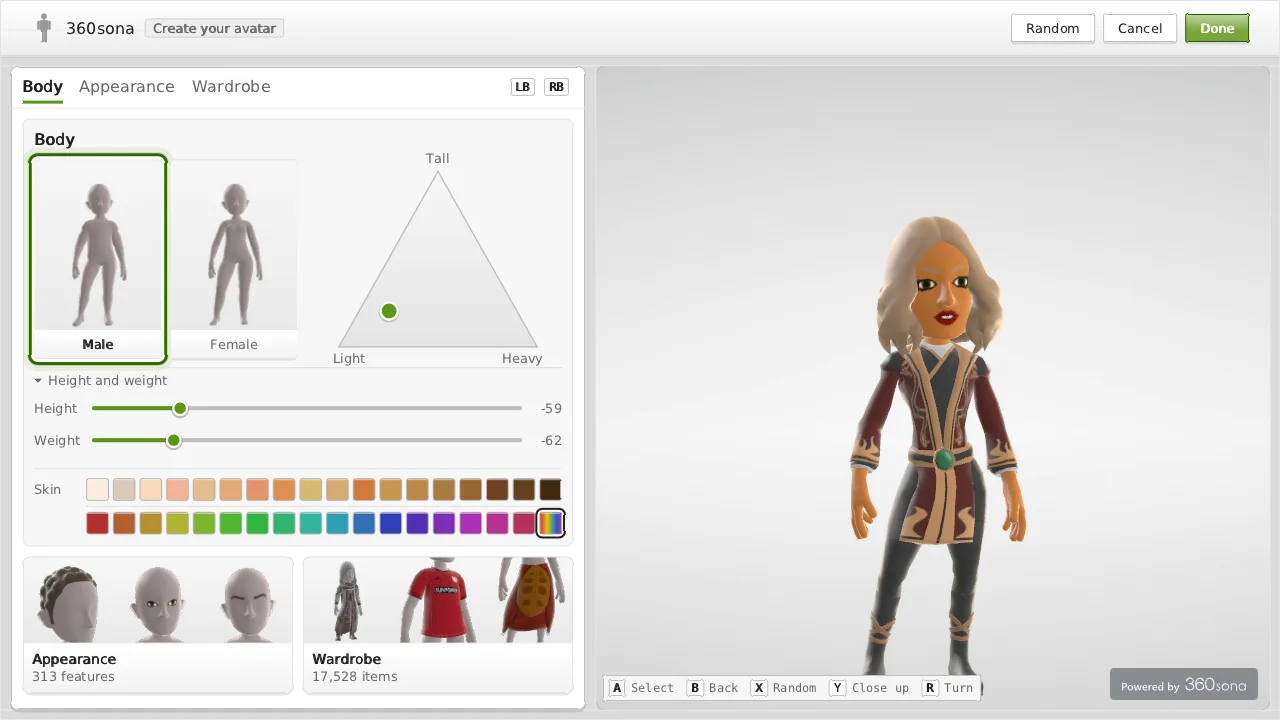
The full editor has the site editor's layout: its Body card, then its two doors, Appearance and Wardrobe, as three tabs.
| Screen | What the player does |
|---|---|
| Body | The site's body card: the two figures (body type), the build triangle (Tall, Light and Heavy at its corners; drag the dot, or left and right for the weight), Height and Weight as two sliders under it, and the skin swatches. Under the card, the Appearance and Wardrobe doors, each with three pictures and its count ("313 features", "17,528 items"), open those tabs. A tap on a figure picks that body; the one in use does nothing. "Height and weight" is always open, because a pad needs the sliders; on the site it is a disclosure that starts closed. A door's pictures are one item each from the first three categories with items, picked as the site picks them (see Pictures). |
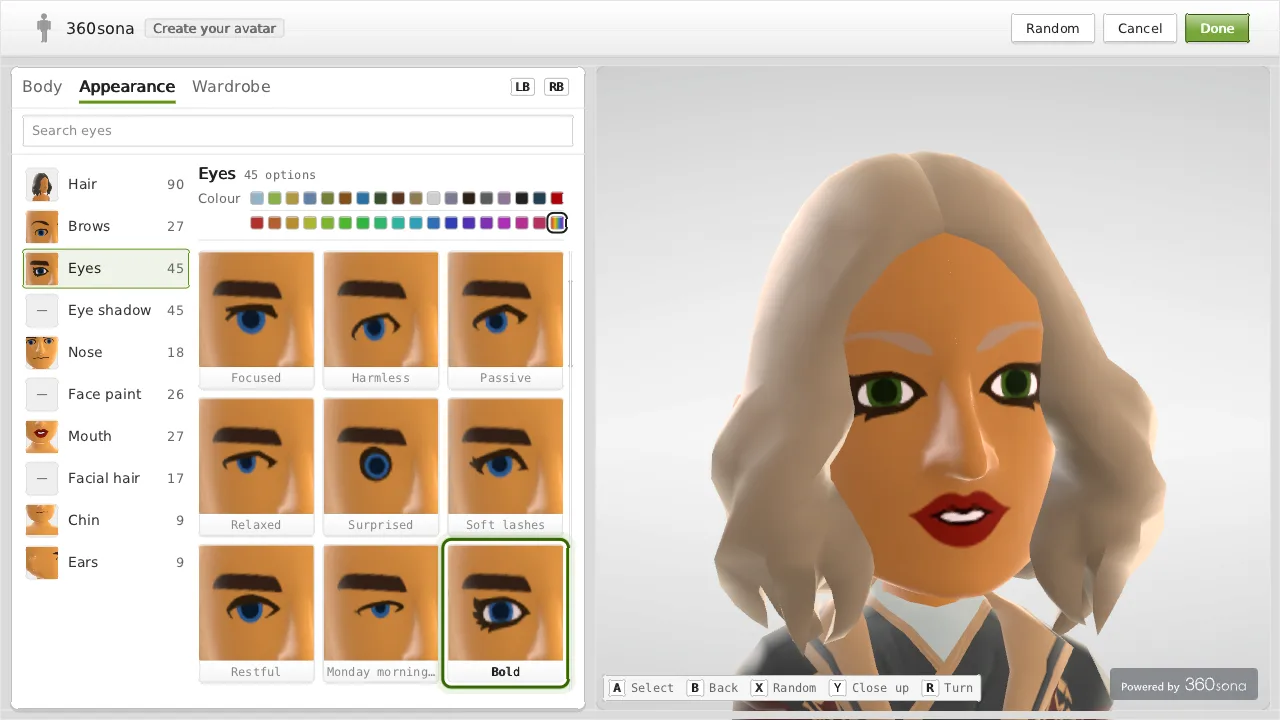
| Appearance | The site's face board: a rail of the parts top to bottom as they sit on a head (hair, brows, eyes, eye shadow, nose, face paint, mouth, facial hair, chin, ears), each with a picture of what is worn and its count, and the part's grid. A part that takes a colour (hair, brows, eyes, eye shadow, face paint, mouth, facial hair) has its colour strip over the grid; chin, nose and ears take the skin's. Opens on Eyes. |
| Wardrobe | Outfits, tops, trousers, shoes, hats, glasses, gloves, wristwear, rings, earrings and props, in the site's order, with a search box. With SONA_EDITOR_GARMENT_COLOURS a worn garment's colourways are a strip over its category's grid (see Garment colours). With SONA_EDITOR_DOORS it opens on a door per category under a "Search every item" box, as the site's Wardrobe: a search there lists what matches in every category, by name, with a back arrow to the doors. |
| Looks | (Quick mode) one of eight generated looks (A), or eight new ones (X). The quick creator starts here. |
| Quick changes | (Quick mode) skin tone, hair, hair colour and top, each changed with left and right. |
SONA_EDITOR_MODE_FULL has Body, Appearance and Wardrobe, in that order. SONA_EDITOR_MODE_QUICK has Looks and
Quick changes. SONA_EDITOR_MODE_WARDROBE has only the Wardrobe (it needs a start manifest). A colour strip is a row of
swatches, one control each: up from a grid's first row onto it, along it, and down again (on Body it comes after the
sliders, and down from it are the doors). The Body card has no Pause, Surprise me or New avatar button.
The swatches are the site's. Each strip is that slot's set from Data/ColorSets.json in the file's order: 18 skin
tones, 36 hair colours, 18 eye colours, and 27 each for brows, mouth, facial hair, face paint and eye shadow. Under it
is the site's own row: a spectrum one short of the set's columns (17 hues under the sets of 18, 8 under the sets of 9),
then Any colour. Any colour is in use whenever the avatar's colour is none of the swatches (the blank figure's grey
skin, a colour from a manifest); picking a swatch and then Any colour gives that colour back. Screen readers hear
"Skin colour 6", "Red skin" and "Any skin colour", as the site's labels. Item grids show rendered pictures of each item (item previews, rendered on the host's renderer two a frame) or,
with SONA_EDITOR_NO_THUMBNAILS, their names. An item whose file is missing has no picture, as on the site. Face
parts are drawn as the site's pictures of them are: on a tan face with the stock eyes (in blue), brows and mouth,
cropped to the part, three across. The Male and Female tiles are renders of the site's two bare figures. A door's
picture is the site's category picture: one item from the category's representative set (the fullest outfits and the
tier under them; for any other category the items that cover only that slot), picked with the editor's seed and kept
for that body, on the grey stand-in. If its file is missing, the next one in the set takes its place.
A pick wears that item and nothing else, as the site's editor does (equipInPlace wears and takes off with
ensureRequired: false): a hat on the blank man is the only thing he wears, and taking a top off leaves no top. An
item over two or more garment slots (an outfit) remembers what it took off, and taking it off puts those back where
the slots are still empty, as the site's does. The random looks and a body switch on a dressed figure still put on
the body's default garments. Done hands back the figure as picked, so it may lack one of the four required garments;
sona_manifest_ready_for_xbox says whether a console takes it.
The camera frames what you are working on, as the site's editor does, with the original's view presets: Body and the Wardrobe's doors show the whole figure; Appearance opens on the head (the site's zoom there is set to 341%), and each part you then pick has its own preset (eyes, mouth, an ear from the side); a Wardrobe category has its own (tops at the site's zoom, set to 136%, turned a little). Y zooms in or out.
Lists are in the site's order: the catalogue's, with garments sorted by how many slots they cover (outfits most first, everything else fewest first), so Eyes start Happy, Sharp, Half moon and Tops start Spring 09 Beta Male Shirt. The doors' search lists by name.
Before 1.1 the full editor had six tabs: Looks, Body, Face, Hair, Colours and Wardrobe. Their ids stay in the header
and keep working for sona_editor_set_screen: SONA_EDITOR_SCREEN_FACE opens Appearance, SONA_EDITOR_SCREEN_HAIR
Appearance on Hair, SONA_EDITOR_SCREEN_COLOURS Body (the Wardrobe in the wardrobe picker). They are deprecated and
kept until 2.0, and no mode lists them; sona_editor_screen_get answers SONA_EDITOR_SCREEN_APPEARANCE (7) for the
new one.
SONA_EDITOR_SCREEN_LOOKS in the full editor is refused: the looks are the quick creator's.
What a list holds
Every list is the site editor's, by the site's own rule, so a body sees the same items in the native editor, the web element and on 360sona.com:
- every item with a name a person can read (
SONA_ITEM_NAMED), whether or not the catalogue has a mesh for it; - not one the data marks unpickable, unless every item of its section is (the 45 eye shadows);
- no garment's body shape (mask
0x1000000) and no hidden duplicate (SONA_ITEM_HIDDEN); - the body checked on models only: a model for the other body is left out, one for both or of no stated body stays;
- and whatever the avatar wears, even a hidden duplicate or the other body's model, so it can be taken off. A worn item without a name, or an unpickable one, is not listed (the site does not list them either).
The catalogue's SONA_ITEM_OFFERED is that rule but the worn items. The host's filter hook and the ctx's content
filter apply on top. editor_item_counts holds every section's count against the web element's for the same avatars
on the full catalogue (84 of 84 agree; a woman's Outfits 2,806, Tops 2,506, a man's 5,276 and 3,932).
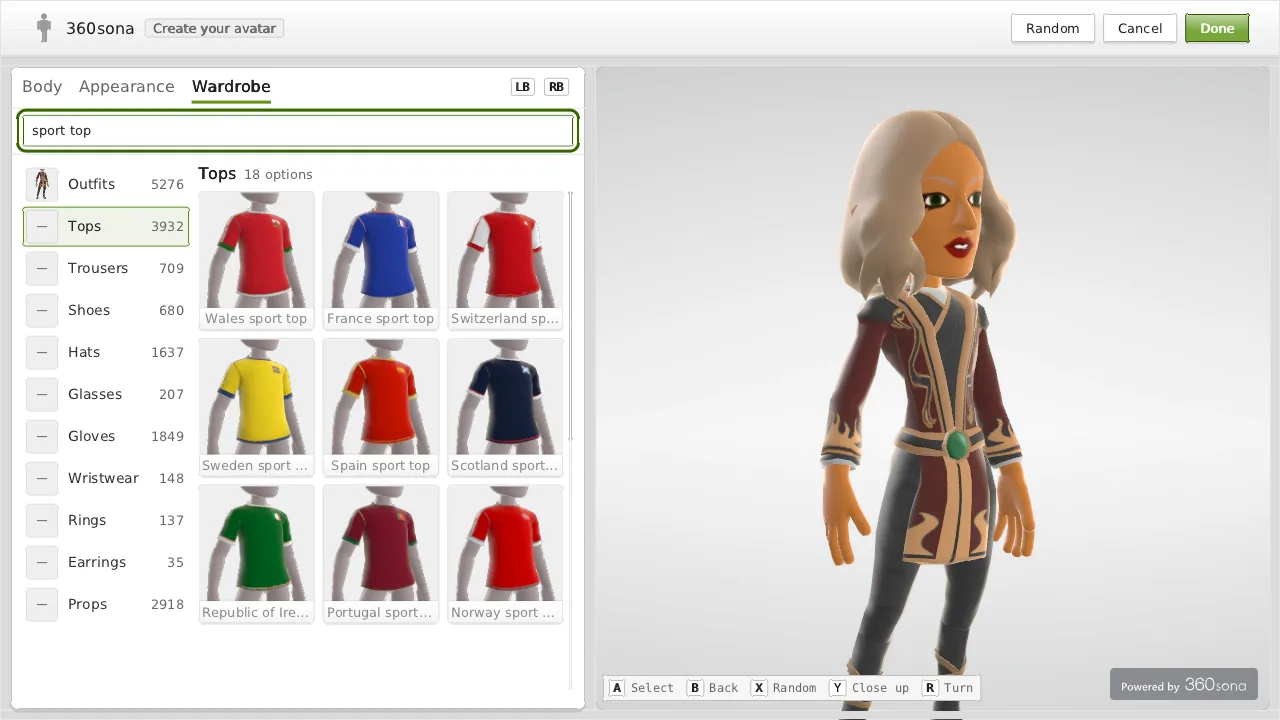
samples/editor/editor_shots.c draws every screen in both built-in themes through sona_editor_snapshot, into a
host target.
Embedding
sona_editor_options o;
sona_editor_defaults(&o);
o.mode = SONA_EDITOR_MODE_FULL;
o.catalogue = catalogue;                   /* sona_catalogue_load */
/* or the player's manifest, to edit it */
o.start = NULL;
sona_editor_theme th;
sona_editor_theme_defaults(&th, SONA_EDITOR_THEME_DARK);
/* the game's colours, font, radius, scale */
th.accent = 0xffe0662b;
sona_editor *ed;
sona_editor_open(editor_ctx, &o, &th, &ed);

/* each frame */
sona_editor_input in;
/* every key, button, stick, pointer and text event */
while (my_next_input(&in)) sona_editor_feed(ed, &in);
uint32_t status = sona_editor_update(ed, dt);
/* the whole editor, drawn by the 360sona renderer */
sona_editor_draw(ed, renderer, &target, NULL);
if (status == SONA_EDITOR_DONE) sona_editor_result(ed, manifest);
#include "sona_editor.h"
// sona.hpp has no editor class: the C calls on the objects' raw() handles
sona_editor_options o;
sona_editor_defaults(&o);
o.mode = SONA_EDITOR_MODE_FULL;
o.catalogue = cat.raw();
// or the player's manifest, to edit it
o.start = nullptr;
sona_editor_theme th;
sona_editor_theme_defaults(&th, SONA_EDITOR_THEME_DARK);
// the game's colours, font, radius, scale
th.accent = 0xffe0662b;
sona_editor *ed = nullptr;
sona_editor_open(ctx.raw(), &o, &th, &ed);

// each frame
sona_editor_input in;
while (my_next_input(&in)) sona_editor_feed(ed, &in);
uint32_t status = sona_editor_update(ed, dt);
sona_editor_draw(ed, r.raw(), &target, nullptr);
uint8_t result[SONA_MANIFEST_BYTES];
if (status == SONA_EDITOR_DONE) sona_editor_result(ed, result);
// SonaEditor: open, input, the result and the UI layer (it has no call that
// draws the avatar)
// start: a manifest to edit
using var ed = new SonaEditor(ctx, cat, SonaEditorMode.Full, start: null);

// each frame: every button, stick, key, pointer and text event
ed.Button(SonaEditorPad.A, true);
if (ed.Update(dt) == SonaEditorStatus.Done) manifest = ed.Result();
// RGBA, to draw over your view of the avatar
byte[] ui = ed.RenderUi(1280, 720);
use sona_editor::{Editor, Mode, Options, Status, Theme};
// start: the player's manifest, to edit it
let o = Options { mode: Mode::Full, start: None, ..Default::default() };
let mut th = Theme::dark();
// the game's colours, font, radius, scale
th.accent = 0xffe0662b;
let mut ed = Editor::open(ctx, cat, &o, Some(&th))?;

// each frame
while let Some(input) = my_next_input() {
    // every key, button, stick, pointer and text event
    ed.feed(&input)?;
}
let status = ed.update(dt);
// the whole editor, drawn by the 360sona renderer
unsafe { ed.draw(r, target, None)? };
if status == Status::Done {
    let result = ed.result()?;
}
# sona.editor.Editor: open, input, the result and the UI layer (it has no
# call that draws the avatar)
from sona.editor import Editor, theme, PAD_A

ed = Editor(ctx, cat, mode="full", start=None, theme_=theme("dark",
    accent=0xFFE0662B))

# each frame: every button, stick, key, pointer and text event
ed.button(PAD_A, True)
if ed.update(dt) == "done":
    manifest = ed.result()
ui = ed.render_ui()   # RGBA, to draw over your view of the avatar
With start NULL the editor opens on 360sona.com's blank man: the site's default figure (seed 0 of
its seed avatars, "atlas") with every garment, the hair and the six face parts off, its own chin, nose, ears, height,
build and colours, and grey skin. A body switch from a figure with nothing on keeps it bare, as the site's does
(sona_manifest_set_gender with SONA_EDIT_NO_DRESS); a dressed figure gets the new body's four default garments.
The editor adds its avatars to the ctx it is given and sona_editor_draw draws every visible avatar in that ctx, so
give it a ctx of its own (a second sona_open) or hide the game's avatars while it is open. sona_editor_update
calls sona_update on that ctx unless SONA_EDITOR_HOST_UPDATES is set.
Drawing
sona_editor_draw draws the whole editor into the host's target with the 360sona renderer, on any backend it has
(GL, GLES, Vulkan, D3D11, D3D12, Metal, Xenos). The frame has two layers:
- The avatar layer.
sona_drawruns on the host's target with the theme's background as the clear. On the light theme the stage behind the avatar is the site's gradient (360sona.css--stage: a vertical grey ramp under a radial pool of light: 207 at the top, 242 just over halfway down, 216 at the bottom), which the site draws behind a clear canvas; the editor hands it tosona_renderer_underlayfor each draw and snapshot, and the renderer draws it first in the main pass. Backends without an underlay (D3D11, D3D12, Metal, Xenos) show the clear, a flat #E4E4E4. The red of both is lowered by what the site's red-only bloom adds back, so the stage shows grey. It draws as the site's editor does: bloom, no occlusion and no key light shadow. Its camera frames the avatar insideavatar_rect, the free part of the screen (the right side in landscape, the top in portrait).sona_editor_viewgives that camera to hosts that callsona_drawthemselves. - The UI layer, over it, as the renderer's overlay (Overlays). The editor rasterises its triangle
list on the CPU into a picture of its own size. The renderer blends that picture over the target after the
avatars, with the credit badge's program, so no backend needed a new shader. Only what changed is rasterised and
uploaded again:
- The diff. The list is a sequence of shapes. A diff of their hashes against the last list rasterised (Myers' O(ND), which keeps the order of the shapes that stay) gives the shapes that went and came.
- The boxes. The changed shapes' old and new boxes are made into a few boxes that do not overlap. A shape that only moved or recoloured, like the focus ring, is boxed triangle by triangle. A pixel outside every box is covered by the same shapes in the same order as before, so it keeps its value.
- The upload. The union of the boxes goes up through
texture_regionwhere the backend has it. - Everything again when the atlas or the size changes, or past 192 edits.
- The proof.
editorchecks each partial repaint against a full raster, byte for byte.
- Afterwards. The renderer has no overlay again, so the host's other draws on it are untouched. Up to two
pending item pictures are rendered too (
sona_editor_thumbnailsdoes it on its own).
The UI is drawn at the editor's size over the whole target, so resize the editor to the target (the SDL3 component does it each frame).
A host that wants the UI in its own 2D pass calls sona_editor_draw_avatar (the avatar layer and the item pictures
only), then draws the UI layer itself:
- The triangle list.
sona_editor_draw_data_getreturns vertices with a position in pixels (top-left origin), texture coordinates and a straight-alpha RGBA colour; 32-bit indices; and commands, each naming a texture and a scissor rectangle. Draw it withSRC_ALPHA, ONE_MINUS_SRC_ALPHA, no depth, no culling. Shapes carry a one-pixel soft edge, so no multisampling is needed. This is the same model as other in-game UI libraries, so any engine's 2D pass can draw it. - The two textures.
sona_editor_texture_getgives the atlas (text in three sizes, the credit badge, a white texel; sample it nearest) and the item pictures (sample linear). Upload again whenrevisionchanges: only thedirtyrectangle when your copy is atdirty_sinceor later, all of it when it is older. - The CPU.
sona_editor_render_uirasterises the same list on the CPU into RGBA pixels, over what the buffer holds or over transparent.sona_editor_snapshotmakes the whole picture: asona_snapshotof the avatar layer with the UI over it. Servers, tests and screenshots use these.
The credit: the avatar layer is drawn with SONA_DRAW_NO_CREDIT, and the UI layer draws the "Powered by 360sona"
badge itself, in the corner of the avatar's area.
A change that fails to build leaves the last avatar that did on screen. The screen reader is told ("That avatar could
not be built."), and sona_editor_build_failures counts these failures. When the very first avatar fails, nothing
shows and sona_editor_busy is 0, so a host that waits for it does not wait forever.
Input
sona_editor_feed takes one event: a gamepad button down or up (SONA_EDITOR_PAD_*), an axis (sticks -1..1 with +y
down, triggers 0..1), a key (SONA_EDITOR_KEY_* with modifiers), a typed code point (the search box), a pointer
(pressed, moved, released; a touch id or 0 for the mouse) or a wheel.
| Gamepad | Keys | Does |
|---|---|---|
| D-pad, left stick | Arrows | Move the focus (held: repeats after a fixed 0.35 s, then every 0.09 s) |
| A | Enter, Space | Choose |
| B | Escape (Backspace with an empty search) | Back a level; at the top, ask to leave |
| X | F2 | Something at random here (eight new looks on Looks, a colour on a strip) |
| Y | F3 | Close up or full body |
| LB, RB | Shift+Tab, Tab | Previous and next screen |
| LT, RT | Page Up, Page Down | A page of items |
| Menu (Start) | F10, Ctrl+Enter | Done |
| View (Back) | (no key) | Ask to leave |
| Right stick | (no key) | Turn and zoom the avatar |
The focus moves in fixed zones: the tabs, the categories, the search box, the content (a grid or rows) and the
actions (Random, Cancel, Done), with a dialog over everything when the player asks to leave. Moving off the edge of
a zone enters the next one. A pointer press and release on the same control acts on it; a drag on a grid scrolls it,
a drag on a slider sets it, a drag on the avatar turns it, the wheel scrolls or zooms. sona_editor_set_search sets
the search text for hosts with an on-screen keyboard (show it when the focused control's role is
SONA_EDITOR_ROLE_SEARCH).
Theme
sona_editor_theme holds the colours (background behind the avatar, panel, raised cells, text, dim text, accent,
text on accent, focus ring, dialog shade), the corner radius, the scale (0: the shorter side over 720) and the font
size. font and font_len take the game's own TrueType or OpenType bytes (copied); without them the editor uses
DejaVu Sans (the site's own UI face), compiled into the module. sona_editor_set_theme and sona_editor_resize re-bake the text atlas.
Sounds are a callback with one of SONA_EDITOR_SOUND_* (move, select, back, tab, page, done, cancel, error, random).
Screen readers
sona_editor_control_count and sona_editor_control_get list every control on screen in reading order: a stable id,
a role (button, tab, list item, option, slider, spin, search), flags (focused, selected, disabled, in a dialog), its
rectangle, its value and range, its place in its group ("3 of 120"), a label ("Blue Hoodie"), a value text ("worn",
"Female", "+0.3") and a hint ("Wear it"). sona_editor_focus_get gives the focused one. sona_editor_announcement
returns what to say when the focus, its value or the screen changed ("Hair. Style, list item, open, 1 of 2"), for
hosts that pass strings to the platform's speech or accessibility API.
The Body type control is one control for both figures: its rectangle spans the Male and Female tiles and the gap
between them, and index says which body is in use (0 Male, 1 Female). A host that draws its own focus ring frames
the half of the rectangle that index names (from rect[0] + index * rect[2] / 2), as the editor's own ring frames
only the figure in use.
Content filter and generated looks
The ctx's content filter (sona_ctx_set_filter, Content filters) applies to every list and every generated
look of an editor opened on that ctx, as it does to every avatar the ctx reads. Two hooks go on top:
filter(user, item): return 0 to leave an item out as well (only items the player owns, say).look(user, seed, index, manifest): write lookindex(0 to 7) ofseedand return 1, or return 0 for the editor's own generator. Its generator is seeded (sona_editor_options.seed; X adds one), deterministic, alternates body types, picks every face part, hair most of the time, clothes from the catalogue (sometimes an outfit, a hat or glasses), colours from the palettes and a body shape.
The SDL3 component
sona::EditorSdl (sona_editor_sdl.hpp, .cpp) is the editor as an SDL3 component, with its sample
sona-editor-sdl. The component takes SDL events and draws the editor with sona_editor_draw into the
renderer's target, whatever its backend (render(target), or render(fbo, width, height) on GL):
- Gamepads are opened as they connect. Keys, text input, the mouse and touch fingers come in too.
- Mouse positions are scaled from the window's coordinates to the target's pixels, so clicks land on a high-density display (Retina, a scaled Windows desktop).
own_gl_ui(GL only) draws the UI with the component's own GL 3.3 pass oversona_editor_draw_avatarinstead.on_soundandon_announcehand sounds and screen-reader text to the game.
sona::EditorSdl ed;
ed.on_announce = [](const std::string &s) { speak(s); };
ed.open(editor_ctx, gl_renderer, options, &theme, width, height);
while (game_running()) {
  for (SDL_Event e; SDL_PollEvent(&e);) ed.handle(e);
  if (ed.update(dt) == SONA_EDITOR_DONE) { ed.result(manifest); break; }
  ed.render(0, width, height);
  SDL_GL_SwapWindow(window);
}
The component and its sample are templates/editor-sdl3 in 360sona-templates.tar.gz: add sona_editor_sdl.hpp and sona_editor_sdl.cpp to an SDL3 program and link
sona_editor and the core.
Garment colours
Some clothes come in colourways: the item's own colour table lists sets of three colours (primary, secondary and
tertiary), and an avatar wears the set its sona_asset_ref.colours match, or the first one. In the catalogue they
have SONA_ITEM_COLOURWAYS (47 items in the full catalogue). Hair and a few other items are tinted from the
manifest's palette instead (SONA_ITEM_COLOURABLE): those are Appearance's colour strips and the skin on Body.
Open the editor with SONA_EDITOR_GARMENT_COLOURS and a worn garment with colourways (up to six of them) gets a
colour strip over its Wardrobe category's grid, as the web element's. Its swatches are the colourways, each shown as
its primary colour and named for screen readers by the nearest plain colour ("Navy", "Red 2"). Choosing one writes
its three colours into the garment's slot (and the last-worn cache when it holds the same item), so the manifest the
game gets back wears it. X picks one at random. A garment's category shows "loading" until its file has loaded.
The colour table comes from the core: sona_item_colourways (SONA_PENDING until the
item has loaded through the ctx's sources). The static editor calls it directly. The shared module, which the Unity
and Godot components and the C#, Python and Rust bindings load, finds it in the loaded core, which exports it once
sona.h, sona.def and sona.map name it; a core without it offers no garment categories.
/* full editor or wardrobe picker */
o.flags |= SONA_EDITOR_GARMENT_COLOURS;
#include "sona_editor.h"
sona_editor_options o;
sona_editor_defaults(&o);
o.flags |= SONA_EDITOR_GARMENT_COLOURS;   // full editor or wardrobe picker
using var ed = new SonaEditor(ctx, cat, SonaEditorMode.Full,
    flags: SonaEditorFlags.GarmentColours);
use sona_editor::{sys, Editor, Options};
let mut o = Options::default();
// full editor or wardrobe picker
o.flags = sys::SONA_EDITOR_GARMENT_COLOURS;
let ed = Editor::open(ctx, cat, &o, None)?;
from sona.editor import Editor, GARMENT_COLOURS

ed = Editor(ctx, cat, mode="full", flags=GARMENT_COLOURS)
Engine components
Unity: SonaAvatarEditor in the com.360sona.renderer package. Godot: SonaEditorView in the GDExtension. C++/SDL3:
below. Each opens this module on the engine's context, feeds it the engine's input, shows the UI layer through
sona_editor_render_ui and draws the avatar with the engine's own renderer from the manifest as it stands. Unreal:
USonaEditorWidget in the Sona360 plugin (Unreal Engine). The web has its own element,
<sona-avatar-editor> (Web avatar editor).
The look and item pictures in the Unity and Godot components come from a headless renderer of the core on the
engine's context (sona_headless_open, opened once per context on first use and kept until it closes): each frame
the component calls sona_editor_thumbnails on it, two pictures a frame. The device is Vulkan, else Direct3D 11 on a
GPU or WARP on Windows, and Metal on macOS and iOS; never GL, so it does not touch the engine's own GL context (Unity
on Linux and Android asks for Vulkan by name, as the core there has GL; the Godot addon's core is built without GL).
While an editor with pictures is open the context culls nothing (the picture avatars stand away from the camera), so a
game with a crowd should hide it while the editor is up. Where no device opens the component warns once and the cells
show names, as SONA_EDITOR_NO_THUMBNAILS does; the thumbnails field (Unity) or property (Godot) turns the pictures
off. The Godot addon keeps the core's Vulkan backend for this, and D3D11 on Windows.
Measured
The exit bar is "a player makes an avatar from nothing in under a minute with a gamepad". The scripted run in
editor_shots starts from the blank figure and visits every tab: the other body, a taller one and a skin tone on
Body; other eyes and their colour, a hairstyle, and the brows and mouth the blank figure lacks on Appearance; a top in
the Wardrobe; then Done.
- The measure: the presses.
editor_shotson an Intel Core Ultra 9 185H machine (its Arc iGPU), the median of three runs: 40 presses from nothing to Done, 14 s at the sample's pace (--pace 0.35), 0 s of it waiting for the avatar before Done. The shortest route to a finished avatar is the quick creator's: 2 presses (A on the first look, then Menu). - The seconds add nothing beyond "nothing blocked": they are the presses at the set pace.
- What a host pays a frame:
editor_shotsdraws the avatar layer only for its pictures, so its seconds leave that out;editor_vkdraws every frame of the run. - The touch run (a skin tone, a hairstyle, brows, a mouth, a hat, Done): 12 taps, 4.2 s.
Limits
- The editor's own generator makes the eight looks; hosts that want the core's seeded random avatars
(
sona_make_random) orsona_quick_lookpass them through the look hook. - The UI layer is rasterised on the CPU and blended by the renderer as a picture; there is no triangle pass for it on the GPU (see Drawing).
- No right-to-left text, and no script outside Latin-1: the atlas has Latin-1 and a few marks, and other code points show "?".
This page as Markdown · All the docs as one file (llms-full.txt)