360sona
360sona is a free toolkit for using Xbox 360 avatars in your own games, apps and web pages. The SDK loads an avatar from its manifest (the 1,000 bytes an Xbox 360 stores for one), dresses it from the stock items, and draws it animated in your own frame. The downloads are for the web, Windows, Linux, macOS, iOS, Android and Xbox 360 homebrew, used from JavaScript, C, C++, C#, Rust and Python, and as packages for Unity, Godot, Unreal and Blender (platforms). It is free: the one condition is the small "Powered by 360sona" badge, which the SDK draws for you.
Overview
| To | Use | Needs |
|---|---|---|
| Show one live avatar on a web page | The live avatar, one script tag | Nothing |
| Draw many avatars in your own canvas | The web Renderer SDK | An app id |
| Use avatars in Unity, Godot or Unreal | Unity, Godot, Unreal | The SDK download |
| Draw avatars from C, C++, C#, Rust or Python | C, C++, C#, Rust, Python | The SDK download |
| Start from a scene that already runs | The plaza starter, on eleven platforms | The SDK download |
| See the whole SDK in one app | The plaza demo | The SDK download |
| Let players make and dress their avatar in your game | The player editor, the quick creator | The SDK download |
| Draw a crowd: 1,000 or 10,000 different avatars | Crowds | The SDK download |
| Draw avatars in your own renderer or engine | Your own renderer: posed meshes, materials, skinning | The SDK download |
| Make pictures on a server: gamerpics, cards, video | Headless rendering, the bot template | The SDK download |
| Get an avatar as a model: GLB, VRM, FBX, a 3D print | VRM and glTF, FBX, 3D print | The SDK download |
| Show the avatar on someone's Xbox account | Gamertag lookup | An app id |
| Let players bring their saved 360sona avatar | Sign in with 360sona | An app id |
| Let an AI agent build and render avatars | MCP, with no person present | Nothing |
App ids are free, and read-only ones are approved at once: ask for one. The SDK download is made
for your app id and holds your sona-licence.json: installing.
Quick start
One avatar from its manifest, waving, in each language and engine. In a game the last step is sona_update and
sona_draw once a frame, into your own target: getting started has the loop.
Open a context with your licence, add an avatar from its manifest, draw it. This is the middle of hello.c, which saves one picture and needs no window (the C tutorial):
/* A context: the licence and where the avatar files come from. */
sona_config_defaults(&cfg);
/* NULL: the app id your download is made for */
cfg.app_id = getenv("SONA_APP_ID");
cfg.licence = licence;
cfg.licence_len = licence_len;
/* the gate: item files from 360sona */
cfg.sources[0].kind = dir ? SONA_SOURCE_DIR : SONA_SOURCE_GATE;
cfg.sources[0].location = dir;
cfg.source_count = 1;
r = sona_open(&cfg, &ctx);
free(licence);
if (r != SONA_OK) return fail("sona_open", NULL, r);

/* An avatar from its manifest. It loads over the next updates. */
r = sona_avatar_add_base64(ctx, argv[2], NULL, &avatar);
if (r != SONA_OK) return fail("sona_avatar_add_base64", ctx, r);

/* No window: one picture, 1.5 s into the wave. */
r = sona_headless_open(ctx, NULL, &h);
if (r != SONA_OK) return fail("sona_headless_open", ctx, r);
sona_render_defaults(&ro);
ro.width = 480;
ro.height = 600;
ro.clip = "GenericWave";
ro.time = 1.5f;
rgba = malloc((size_t)ro.width * ro.height * 4);
r = rgba ? sona_headless_render(h, avatar, &ro, rgba) : SONA_E_MEMORY;
if (r != SONA_OK) return fail("sona_headless_render", ctx, r);
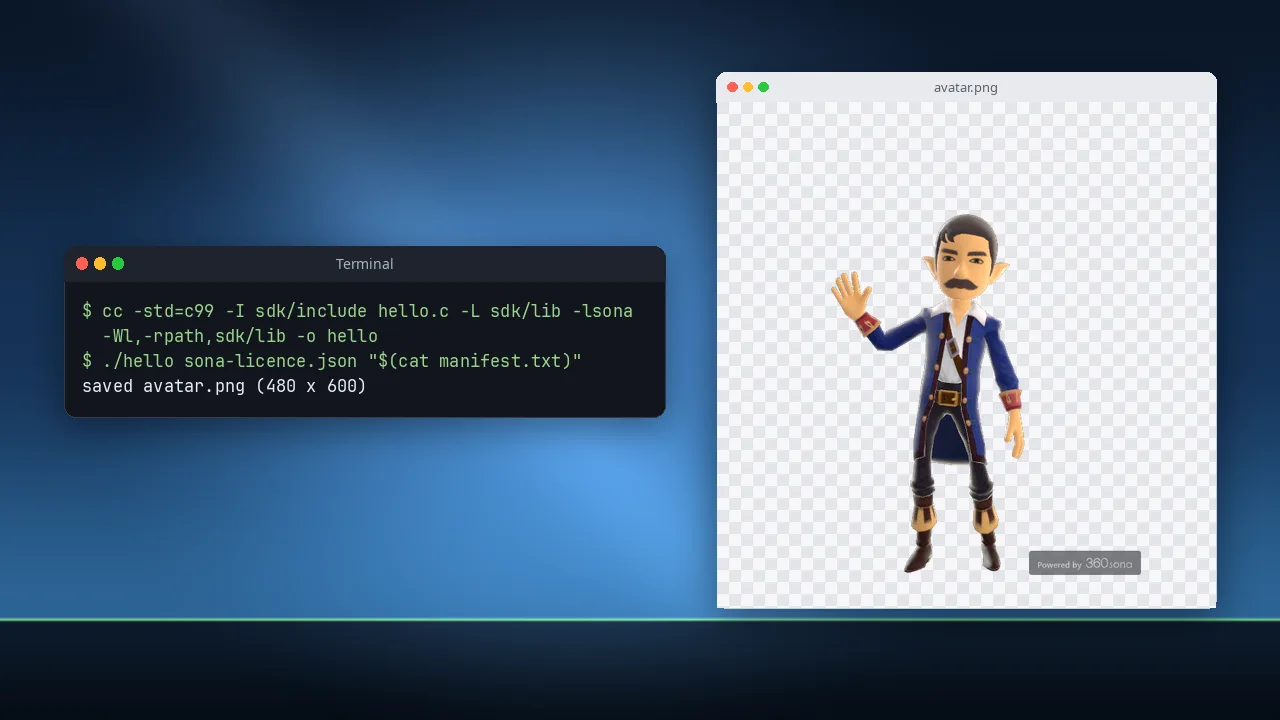
cc -std=c99 -I sdk/include hello.c -L sdk/lib -lsona \
  -Wl,-rpath,sdk/lib -o hello
./hello sona-licence.json "$(cat manifest.txt)"
manifest.txt is an avatar as base64, from 360sona.com's share box; the item files stream from 360sona. The
program writes avatar.png:
The same through sona.hpp, the header-only wrapper. This is the middle of hello.cpp
(the C++ tutorial):
sona::Config cfg;
if (!cfg.licence_file(argv[1])) { std::fprintf(stderr, "cannot read %s\n",
    argv[1]); return 1; }
// unset: the app id your download is made for
if (const char *app = std::getenv("SONA_APP_ID")) cfg.app_id(app);
// the gate: item files from 360sona
if (dir) cfg.dir(dir); else cfg.gate();
sona::Context ctx(cfg);
sona::Avatar avatar = ctx.add_base64(argv[2]);

// The headless renderer is plain C: sona.hpp hands over the raw handles.
sona_headless *h = 0;
if (sona_headless_open(ctx.raw(), 0, &h) != SONA_OK) { std::fprintf(stderr,
    "no device to draw with\n"); return 1; }
sona_render_options ro;
sona_render_defaults(&ro);
ro.width = 480;
ro.height = 600;
ro.clip = "GenericWave";
ro.time = 1.5f;
std::vector<uint8_t> rgba(ro.width * ro.height * 4);
sona_result r = sona_headless_render(h, avatar.raw(), &ro, rgba.data());
The C# binding runs on .NET 8 and inside Unity. This is the middle of Hello.cs (the C# tutorial):
var options = new SonaOptions
{
    Licence = File.ReadAllBytes(args[0]),
    AppId = Environment.GetEnvironmentVariable("SONA_APP_ID"),
};
// the gate: item files from 360sona
options.Sources.Add(dir != null ? SonaSourceSpec.Dir(dir) :
    SonaSourceSpec.Gate());
using var ctx = new SonaContext(options);

var avatar = ctx.AddBase64(args[1]);
while (avatar.State != SonaAvatarState.Ready &&
    avatar.State != SonaAvatarState.Failed) ctx.Update(1.0 / 60);
if (avatar.State != SonaAvatarState.Ready) { Console.Error.WriteLine("the avatar did not load"); return 1; }

avatar.Play("GenericWave");
for (var i = 0; i < 60; i++) ctx.Update(1.0 / 60);

var head = new float[16];
avatar.TryGetJointWorld(SonaJoints.Find("Head"), head);
Console.WriteLine($"head at {head[12]:F3} {head[13]:F3} {head[14]:F3}");

using var headless = new SonaHeadless(ctx);
var rgba = headless.Render(avatar, new SonaRenderOptions { Width = 480,
    Height = 600, Clip = "GenericWave", Time = 1.5f });
File.WriteAllBytes("avatar.png", ctx.EncodePng(rgba, 480, 600));
The sona crate wraps the C library safely. This is the middle of main.rs
(the Rust tutorial):
let mut cfg = sona::Config::new().licence(licence);
if let Ok(app) = std::env::var("SONA_APP_ID") {
    cfg = cfg.app_id(&app); // unset: the app id your download is made for
}
cfg = match &dir {
    Some(d) => cfg.dir(d),
    None => cfg.gate(None),
};
let ctx = sona::Context::open(cfg).map_err(|e| e.to_string())?;

// An avatar from its manifest. It loads over the next updates.
let avatar = ctx.add_base64(&args[1],
    &sona::AddOptions::default()).map_err(|e| e.to_string())?;

// No window: one picture, 1.5 s into the wave.
let h = sona::Headless::open(&ctx,
    &sona::HeadlessOptions::default()).map_err(|e| e.to_string())?;
let mut ro = sona::RenderOptions::default();
ro.width = 480;
ro.height = 600;
ro.clip = Some("GenericWave".into());
ro.time = 1.5;
let rgba = h.render(&avatar, &ro).map_err(|e| e.to_string())?;
The sona package reads posed avatars as plain data. This is the middle of hello.py
(the Python tutorial):
with sona.Context(app_id=os.environ.get("SONA_APP_ID"), licence=licence,
                  sources=[source]) as ctx:
    avatar = ctx.add_base64(manifest)
    while not avatar.settled:
        ctx.update(1 / 60)
    if not avatar.ready:
        sys.exit("the avatar did not load")

    avatar.play("GenericWave")
    for _ in range(60):
        ctx.update(1 / 60)

    pose = avatar.pose()
    head = avatar.joint_world("Head")
    print(len(pose.meshes), "meshes;", "head at", tuple(round(v,
        3) for v in head[12:15]))

    with sona.Headless(ctx) as h:
        rgba = h.render(avatar, width=480, height=600, clip="GenericWave",
            time=1.5)
    with open("avatar.png", "wb") as f:
        f.write(ctx.png_encode(rgba, 480, 600))
With the Renderer SDK in your own canvas. manifestBase64 is the avatar as base64, from 360sona.com's share box
(the web tutorial):
import { SonaRenderer } from './sona-renderer.js';

const canvas = document.querySelector('canvas');
const sona = await SonaRenderer.create({ canvas });
const avatar = sona.add(manifestBase64, { clip: 'GenericWave' });
await avatar.ready;
It is the avatar drawn at the top of this page. With no SDK download and no key, the live avatar does the same in an iframe: rt.avatar(manifestBase64), then
rt.play('GenericWave') (the live avatar).
Add the 360sona Renderer package and put a SonaContext in the scene with your licence. This script, on any
GameObject, adds the avatar; manifest is a text asset holding it as base64 (the package's Components sample,
the Unity tutorial):
using UnityEngine;

namespace Sona.Unity.Samples
{
    public sealed class HelloAvatar : MonoBehaviour
    {
        public TextAsset manifest;

        void Start()
        {
            var avatar = new GameObject("Avatar").AddComponent<SonaAvatar>();
            avatar.manifestAsset = manifest;
            avatar.clip = "GenericWave";
        }
    }
}
Copy the addon into the project and put sona-licence.json at res://. This is the root script of the demo's hello
scene, a Node3D with a Camera3D child; SonaServer opens the context when the avatar enters the tree
(the Godot tutorial):
func _ready() -> void:
    var avatar = ClassDB.instantiate("SonaAvatar3D")
    var text = FileAccess.get_file_as_string("res://hello/manifest.txt")
    avatar.manifest = text.strip_edges()
    avatar.clip = "GenericWave"
    add_child(avatar)
    avatar.avatar_ready.connect(func(): avatar.frame_camera($Camera3D))
Enable the Sona360 plugin. This actor holds a USonaAvatarComponent and gives it the manifest from
Content/manifest.txt; place it in a level (the SonaStarter project, the Unreal tutorial):
AHelloAvatar::AHelloAvatar()
{
    Avatar = CreateDefaultSubobject<USonaAvatarComponent>(TEXT("Avatar"));
    RootComponent = Avatar;
    Avatar->Clip = TEXT("GenericWave");
}

void AHelloAvatar::BeginPlay()
{
    Super::BeginPlay();
    FString Manifest;
    if (FFileHelper::LoadFileToString(Manifest,
        *FPaths::Combine(FPaths::ProjectContentDir(), TEXT("manifest.txt"))))
        Avatar->SetManifest(Manifest.TrimStartAndEnd());
}
AHelloAvatar is declared in HelloAvatar.h beside it, with Avatar as a UPROPERTY. In a Blueprint, the node
Load 360sona Avatar does the same.
Start
| Page | What it covers |
|---|---|
| Installing | The download for each platform, what is in it, where the library goes, the packages |
| Getting started | A context, an avatar and the frame loop in a window of your own |
| Playground | Pick a costume, a clip, a prop, a framing and the light, see it live, copy the code in JavaScript and C |
| Concepts | The context, avatars, renderers, the frame, units, threading, memory |
| Manifests | The 1,000 bytes of one avatar: what is in them, where they come from, editing them |
| Items and slots | Item ids, the slots they fill, bodies, props, custom items |
| Clips and animation | Playing, crossfading and queueing clips, layers, events, root motion |
| Item files, the gate and the licence | Where the item files come from, the gate, the licence file |
| The credit | Where "Powered by 360sona" shows, and how to move it |
| Cookbook | Short recipes for game moments |
| Examples | Every example program with its picture and code |
| Platforms | Each platform's backends, library file, build and limits |
| Performance | Frame times, load times and memory as the bench measures them, and what sets them |
| Limits and quotas | Every fixed limit of the library and every quota of the servers |
| Licence and credit | What is free, the badge, what you may ship |
| Troubleshooting | Symptoms, causes, and every error code |
| FAQ | Short answers to common questions |
| Glossary | The words these docs use |
| Versions and migration | What a release may change, checking the version, moving from 1.0 to 1.1 |
| Changelog | What changed in each version |
Tutorials
A tutorial is numbered steps that end with something running.
| You use | Tutorial | It builds |
|---|---|---|
| A web page | Web | One avatar with a script tag, then several in your canvas |
| Unity | Unity | The package, a SonaAvatar, the Plaza sample |
| Godot 4.7 or later | Godot | The addon, a SonaAvatar3D, the plaza scene |
| Unreal Engine | Unreal | The Sona360 plugin and the SonaPlaza project |
| C | C | One avatar to a PNG, no window |
| C++ | C++ | The same through sona.hpp |
| C# | C# | One avatar, where its head is, and a PNG, in a console program |
| Rust | Rust | One avatar to a PNG through the sona crate |
| Python | Python | One avatar's pose as plain data, and a PNG |
| Blender | Blender | An avatar imported with its clips, and exported back |
Starters and templates, each a program to copy:
| Template | Tutorial | What it is |
|---|---|---|
| Plaza starter | The plaza starter | Twelve avatars walking about a plaza, the same bare scene on eleven platforms |
| Plaza demo | The plaza demo | A park of avatars: pick, edit, create and save them, native and web |
| C++ starter | The C++ starter | The project sona project new makes |
| Lobby | The lobby | Sign in with 360sona or a gamertag, players synced over UDP |
| Bot and server | The bot | Gamerpics and outfit cards over HTTP, no window |
| VTuber kit | The VTuber kit | Webcam and microphone drive the face, transparent window |
| VR | The VR template | OpenXR, a whole body from a headset and two controllers |
| Web crowd | The web crowd | 1,000 different avatars in one canvas |
All of them on one page: templates and starters.
Guides
One page per feature: what it is, the smallest example, then every call.
Reference
| Page | What is in it |
|---|---|
| The C reference | Every function of sona.h and the optional modules: signature, rules, errors |
| Struct fields | Every field of every public struct, with its unit and its default |
| Every package, name by name | Each public name of the C++, C#, Python, Rust and WebAssembly packages, with the C function it calls |
| Engine reference | Every component, node and class of the Unity package, the Godot extension and the Unreal plugin: fields, methods, signals and Blueprint functions |
| CLI reference | Every sona command: its synopsis, what it does, its options and the exit codes |
| The web API | The live avatar, the web Renderer SDK, the HTTP API, sign-in, MCP |
| The web SDK reference | Every class and method of sona-renderer.js and its packages, with live examples |
| Error codes | Every SONA_E_*, its cause and its fix |
For tools and agents: api.json (and beside it api/bindings.json, api/fields.json, api/units.json,
api/defaults.json and api/binding-notes.json), llms.txt and llms-full.txt. Every page is
also plain Markdown: put .md in place of .html.
Common questions
What is 360sona? · Xbox 360 avatars in Unity · in Unreal · in Godot · on the web · in C and C++ · an avatar from a gamertag · GLB and VRM export · what a game may ship
360sona is not affiliated with or endorsed by Microsoft.
This page as Markdown · All the docs as one file (llms-full.txt)