Tutorial: your first avatar in C
A small C program that adds one avatar, plays its wave and saves a picture of it, with no window and no GPU code of your own. The finished program is code/hello.c.
1. What you need
- The SDK for your platform, from your app's page (getting it). It holds
sona.h, the library (libsona.so, orsona.dllwithsona.lib) and yoursona-licence.json. - A C compiler: gcc, clang or MSVC.
- A manifest: the 1,000 bytes that describe an avatar, as base64. Make one at 360sona.com and copy it from the
editor's share box, get one from the API (
GET /sona/v1/avatar/random), or print one with the tools (sona avatar new, orsona avatar random --seed 7). Save it asmanifest.txt.
The avatar's item files stream from 360sona (SONA_SOURCE_GATE), so nothing else is needed. --dir <folder> reads
them from a folder of your own instead (SONA_SOURCE_DIR).
2. Open a context
A context holds the licence, where avatar files come from, and every avatar. sona_config_defaults fills the
config; you set the licence bytes and one source.
Note
Your download is made for your app id, so app_id can stay NULL; SONA_APP_ID, when set, names
another.
/* A context: the licence and where the avatar files come from. */
sona_config_defaults(&cfg);
/* NULL: the app id your download is made for */
cfg.app_id = getenv("SONA_APP_ID");
cfg.licence = licence;
cfg.licence_len = licence_len;
/* the gate: item files from 360sona */
cfg.sources[0].kind = dir ? SONA_SOURCE_DIR : SONA_SOURCE_GATE;
cfg.sources[0].location = dir;
cfg.source_count = 1;
r = sona_open(&cfg, &ctx);
free(licence);
if (r != SONA_OK) return fail("sona_open", NULL, r);
On an error, sona_last_error gives a message and a fix, as the program's fail prints them.
3. Add the avatar
sona_avatar_add_base64 returns at once. The avatar loads over the following updates and is READY when every
item has arrived.
/* An avatar from its manifest. It loads over the next updates. */
r = sona_avatar_add_base64(ctx, argv[2], NULL, &avatar);
if (r != SONA_OK) return fail("sona_avatar_add_base64", ctx, r);
4. Draw it
The headless renderer is a device of the library's own, with no window. sona_headless_render waits for the avatar
to load, poses it at ro.time seconds into ro.clip, draws it and copies the picture into rgba:
width * height * 4 bytes, RGBA, the top row first. A game draws with sona_draw into its own target instead.
/* No window: one picture, 1.5 s into the wave. */
r = sona_headless_open(ctx, NULL, &h);
if (r != SONA_OK) return fail("sona_headless_open", ctx, r);
sona_render_defaults(&ro);
ro.width = 480;
ro.height = 600;
ro.clip = "GenericWave";
ro.time = 1.5f;
rgba = malloc((size_t)ro.width * ro.height * 4);
r = rgba ? sona_headless_render(h, avatar, &ro, rgba) : SONA_E_MEMORY;
if (r != SONA_OK) return fail("sona_headless_render", ctx, r);
5. Save it
sona_png_encode turns rgba into a PNG with the credit in its text chunks. Free what the library hands out with
sona_free.
/* A PNG with the credit in its text chunks. */
r = sona_png_encode(ctx, rgba, ro.width, ro.height, &png, &png_len);
if (r != SONA_OK) return fail("sona_png_encode", ctx, r);
out = fopen(path, "wb");
if (!out || fwrite(png, 1, png_len, out) != png_len) { fprintf(stderr,
    "cannot write the picture\n"); return 1; }
fclose(out);
6. Build and run
On Linux, with the SDK unpacked in sdk/:
cc -std=c99 -I sdk/include hello.c -L sdk/lib -lsona -Wl,-rpath,sdk/lib -o \
    hello
./hello sona-licence.json "$(cat manifest.txt)"
With MSVC: cl /I sdk\include hello.c sdk\lib\sona.lib, and keep sona.dll next to hello.exe.
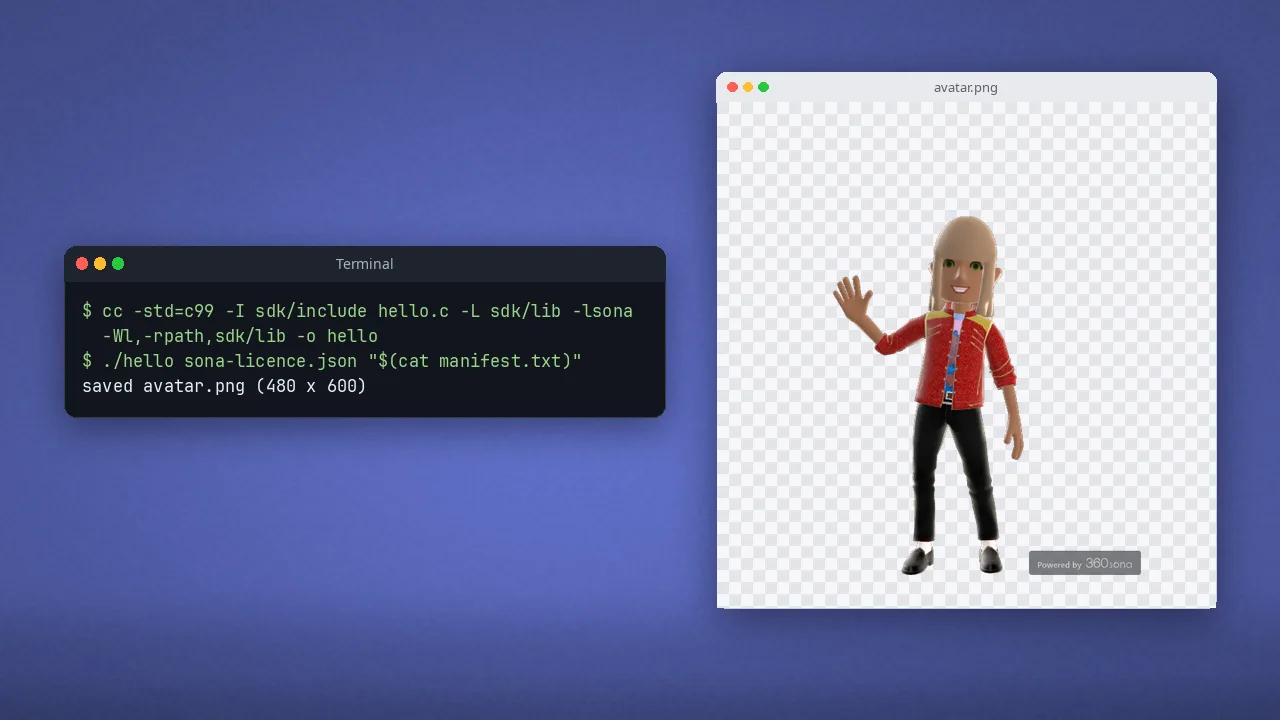
It prints saved avatar.png (480 x 600) and writes the picture:
Next
- Draw every frame in your own window: getting started, the frame and drawing with the SDK's backends.
- Many avatars: crowds. Clips and layers: clips, layers.
- Credit: the library draws a small "Powered by 360sona" badge in a corner of each frame. Keep it, or turn it off
with
SONA_DRAW_NO_CREDITand put the line in your credits.
This page as Markdown · All the docs as one file (llms-full.txt)