Tutorial: the bot and server template
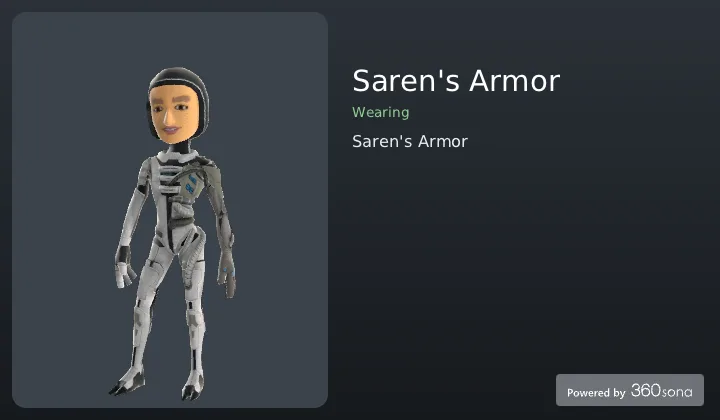
The bot and server template is a small HTTP server that draws a player's avatar as a gamerpic or an outfit card on a machine with no window, for Discord bots, web sites and stream overlays.
What it serves
| Route | What you get |
|---|---|
GET /gamerpic/<gamertag>.png |
A square head-and-shoulders picture, 256 x 256, transparent around the avatar |
GET /card/<gamertag>.png |
An outfit card: the whole avatar, the gamertag and the names of what it wears |
GET /health |
ok |
A gamertag is looked up on 360sona (sona_players, cached, within its limits); a:<account>/<slot> and w:<case>
ids work too. Add ?avatar=<base64 manifest> to draw that avatar instead of looking one up.
1. Build it
templates/bot/main.c comes in 360sona-templates.tar.gz (getting it); unpack it into the folder of your SDK download (sdk/ below). The card's text is drawn with stb_truetype.h, one header of the stb libraries
(where it comes from): put it beside your build.
tar xzf 360sona-templates.tar.gz -C sdk
cc -std=c11 -O2 -I sdk/include -I . -DSCREEN_PAINT_STB='"stb_truetype.h"' \
    sdk/templates/bot/main.c \
  -L sdk/lib -lsona -lm -Wl,-rpath,sdk/lib -o sona_bot
--font <file.ttf> names the font for the card's text when you run it: any TrueType font, such as DejaVuSans.ttf
of the DejaVu fonts.
2. Run it
Give it your licence file, and the offline catalogue so cards can name the items. sona-catalogue.bin is
data/sona-catalogue.bin of a download asked for with &catalogue=1, copied beside the program
(installing); without it the cards list no item names.
sona_bot --licence sona-licence.json --catalogue sona-catalogue.bin --font \
    DejaVuSans.ttf --port 8360 &
sleep 3    # until it says "listening"
curl -sf -G --data-urlencode "avatar=$(cat me.b64)" -o pic.png \
    http://127.0.0.1:8360/gamerpic/me.png
curl -sf -G --data-urlencode "avatar=$(cat me.b64)" -o card.png \
    http://127.0.0.1:8360/card/me.png
me.b64 is a manifest as base64. Without avatar=, the name in the address is a gamertag, which the bot looks up
on 360sona: http:/.
It listens on 127.0.0.1 only: put your bot or a proxy in front of it. --device software draws on a CPU rasteriser
(lavapipe or llvmpipe), so it runs in a container with no GPU. For one picture and no server:
sona_bot --licence sona-licence.json --once card <gamertag> card.png
3. How it works
One ctx, one headless device and one sona_players lookup client stay open, so each request is a warm render. The
lookup asks 360sona for the gamertag's avatar and waits for the answer:
static sona_result look_up(bot *b, const char *id, look *out) {
  sona_player_look pl;
  sona_player_event ev;
  double until = now_s() + 15;
  sona_result r = sona_players_watch(b->players, &id, 1, 0);
  if (r != SONA_OK) return r;
A gamerpic is one call to the headless device, framed on the bust and drawn at twice its size, then halved and encoded as PNG:
sona_render_defaults(&ro);
ro.width = ro.height = 512;
ro.preset = SONA_PRESET_BUST;
rgba = (uint8_t *)malloc((size_t)512 * 512 * 4);
half = (uint8_t *)malloc((size_t)256 * 256 * 4);
if (!rgba || !half) { free(rgba); free(half); return SONA_E_MEMORY; }
r = sona_headless_render_manifest(b->h, manifest, &ro, rgba);
The card draws the whole avatar the same way, lays it out with the gamertag and the item names from
sona_catalogue_get, and puts the credit badge from sona_credit_get in its corner.
4. Make it yours
- Change the card's size and layout in
card();CARD_WandCARD_Hare at the top of the file. - One request runs at a time on one device. For more, run more processes behind your bot's queue.
- Keep the "Powered by 360sona" badge on the pictures you post: the licence requires the credit where they are shown.
Next
- Headless rendering: the device, the options and video out.
- Other players' avatars: the lookups, their cache and their limits.
- An avatar from a gamertag, the short answer.
This page as Markdown · All the docs as one file (llms-full.txt)