Animation layers, masks, blend spaces and state machines
An avatar plays one clip at a time with sona_avatar_play, _crossfade and _queue. Layers play more on top of
it: a wave on the upper body over a walk on the legs, a nod added on top of whatever the body does, a walk that
turns into a run as the speed goes up, and a small state machine that a game drives with one call a frame.
The calls are 25 functions and 9 structs (C reference: animation layers). An avatar with no layers poses exactly as one that plays a clip alone, bit for bit, and costs the same.
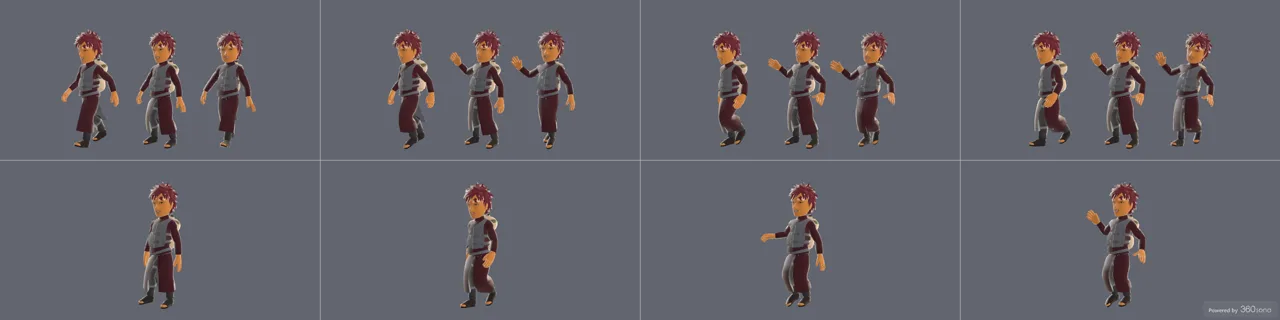
Quick start: a wave over a walk
float upper[SONA_JOINT_COUNT];
sona_layer_options lo;

/* the stock walk */
sona_avatar_play(a, "00400000-0064-0003-c1c8-f109a19cb2e0", NULL);
/* walk in place, the game moves the avatar */
sona_avatar_root_motion(a, SONA_ROOT_MOTION_EXTRACT);

sona_mask_preset(SONA_MASK_UPPER_BODY, upper);
sona_layer_defaults(&lo);
lo.mask = upper;
/* layer 1: the wave, on Spine and above */
sona_avatar_layer_play(a, 1, "GenericWave", &lo);
avatar.play("00400000-0064-0003-c1c8-f109a19cb2e0");   // the stock walk
// walk in place, the game moves the avatar
avatar.root_motion(SONA_ROOT_MOTION_EXTRACT);

float upper[SONA_JOINT_COUNT];
sona_mask_preset(SONA_MASK_UPPER_BODY, upper);
sona_layer_options lo;
sona_layer_defaults(&lo);
lo.mask = upper;
// layer 1: the wave, on Spine and above
sona_avatar_layer_play(avatar.raw(), 1, "GenericWave", &lo);
avatar.Play("00400000-0064-0003-c1c8-f109a19cb2e0");   // the stock walk
// walk in place, the game moves the avatar
avatar.SetRootMotion(SonaRootMotion.Extract);

var upper = SonaMasks.Preset(SonaMask.UpperBody);
// layer 1: the wave, on Spine and above
avatar.PlayLayer(1, "GenericWave", new SonaLayerOptions { Mask = upper });
// the stock walk
avatar.play("00400000-0064-0003-c1c8-f109a19cb2e0",
    &PlayOptions::default())?;
// walk in place, the game moves the avatar
avatar.set_root_motion(RootMotion::Extract)?;

let upper = mask_preset(Mask::UpperBody);
// layer 1: the wave, on Spine and above
avatar.layer_play(1, "GenericWave", &LayerOptions { mask: Some(upper),
    ..Default::default() })?;
avatar.play("00400000-0064-0003-c1c8-f109a19cb2e0")   # the stock walk
# walk in place, the game moves the avatar
avatar.root_motion("extract")

upper = sona.mask_preset("upper_body")
# layer 1: the wave, on Spine and above
avatar.layer_play(1, "GenericWave", mask=upper)
The legs keep the walk and the spine, arms and head take the wave. The upper body follows the walking hips, since layers blend each joint's own (local) rotation.
How layers stack
There are SONA_LAYER_MAX (8) layers per avatar, applied lowest index first over the avatar's own clip (after its
crossfade). Each layer has:
- content: a clip (
sona_avatar_layer_play), a blend space (_layer_blend) or a state machine (_layer_machine). New content crossfades from what the layer showed overfade_seconds(default 0.2; 0 cuts). Content on an empty layer fades in from nothing. - a weight 0..1 (
sona_avatar_layer_weightmoves it over time).(a, layer, w, over_seconds) - a mask: one weight per joint (
SONA_JOINT_COUNTfloats), multiplied by the layer weight.NULLis every joint. - a mode:
SONA_LAYER_OVERRIDEblends the layer's pose over what is below;SONA_LAYER_ADDITIVEadds the difference between its clip and a reference frame of the same clip (additive_ref, seconds; default the first frame). A nod authored as a clip from a neutral pose adds just the nod to any body.
Pose overrides (sona_avatar_override) still come last, after every layer. Clip events of the avatar's own clip,
marks and footfalls keep working; footfalls and sona_joint_world see the layered pose.
sona_avatar_layer_stop fades a layer out and empties it. A layer with
SONA_LAYER_ONE_SHOT and loop = 0 fades itself out by the end of its clip and empties (the wave a player
triggers once).
Clips load in the background like the avatar's own; a layer shows nothing until its clips have loaded
(sona_layer_info.ready). Layers can be set before the avatar is READY; they start once it is.
Masks
sona_mask_preset fills a mask: NONE, FULL, UPPER_BODY (Spine and everything below it: chest, neck, head,
arms, hands, fingers, the prop joints), LOWER_BODY (the hips and legs), HEAD (Neck and Head), LEFT_ARM,
RIGHT_ARM and ARMS (from the shoulders). sona_mask_branch(mask, joint, w) sets one joint and every joint below
it, so masks can be built or softened by hand:
sona_mask_preset(SONA_MASK_UPPER_BODY, m);
/* half the wave in the spine ... */
sona_mask_branch(m, sona_joint_find("Spine"), 0.5f);
/* ... all of it from the chest up */
sona_mask_branch(m, sona_joint_find("Chest"), 1.0f);
float m[SONA_JOINT_COUNT];
sona_mask_preset(SONA_MASK_UPPER_BODY, m);
// half the wave in the spine ...
sona_mask_branch(m, sona_joint_find("Spine"), 0.5f);
// ... all of it from the chest up
sona_mask_branch(m, sona_joint_find("Chest"), 1.0f);
var m = SonaMasks.Preset(SonaMask.UpperBody);
// half the wave in the spine ...
SonaMasks.Branch(m, SonaJoints.Find("Spine"), 0.5f);
// ... all of it from the chest up
SonaMasks.Branch(m, SonaJoints.Find("Chest"), 1.0f);
// the crate has no mask helpers: the C calls through sona_sys
let mut m = [0f32; sona_sys::SONA_JOINT_COUNT];
let spine = joint_find("Spine").unwrap_or(0);
let chest = joint_find("Chest").unwrap_or(0);
unsafe {
    sona_sys::sona_mask_preset(sona_sys::SONA_MASK_UPPER_BODY,
        m.as_mut_ptr());
    // half the wave in the spine ...
    sona_sys::sona_mask_branch(m.as_mut_ptr(), spine, 0.5);
    // ... all of it from the chest up
    sona_sys::sona_mask_branch(m.as_mut_ptr(), chest, 1.0);
}
m = sona.mask_preset("upper_body")
# half the wave in the spine ...
m = sona.mask_branch(m, sona.joint_find("Spine"), 0.5)
# ... all of it from the chest up
m = sona.mask_branch(m, sona.joint_find("Chest"), 1.0)
The tree is the avatar rig's.
Parameters
Parameters are named floats set on each avatar and read by blend spaces and state machines. Names belong to the ctx
and are numbered from 0 in the order they are first asked for (sona_param_id), up to SONA_PARAM_MAX (32). A game
that names its parameters at start-up can then set all of them with one call a frame:
int32_t speed = sona_param_id(ctx, "speed");      /* 0 */
int32_t turn = sona_param_id(ctx, "turn");        /* 1 */
/* ... */
float p[2] = { player_speed, player_turn };
/* each frame, before sona_update */
sona_avatar_set_params(a, 0, p, 2);
float player_speed = 0, player_turn = 0;
int32_t speed = sona_param_id(ctx.raw(), "speed");    // 0
int32_t turn = sona_param_id(ctx.raw(), "turn");      // 1
// ...
float p[2] = { player_speed, player_turn };
// each frame, before the update
sona_avatar_set_params(avatar.raw(), 0, p, 2);
float playerSpeed = 0, playerTurn = 0;
int speed = ctx.ParamId("speed");     // 0
int turn = ctx.ParamId("turn");       // 1
// ...
// each frame, before the update
avatar.SetParams(0, new[] { playerSpeed, playerTurn });
let (player_speed, player_turn) = (0.0f32, 0.0f32);
let speed = ctx.param_id("speed");    // Some(0)
let turn = ctx.param_id("turn");      // Some(1)
// ...
// each frame, before the update
avatar.set_params(0, &[player_speed, player_turn])?;
speed = ctx.param_id("speed")    # 0
turn = ctx.param_id("turn")      # 1
# ...
# each frame, before the update
avatar.set_params(0, [player_speed, player_turn])
sona_avatar_set_param sets one, sona_avatar_param reads one back.
Blend spaces
A blend space places clips at points on one axis (idle, walk, run by speed) or two (a direction), and blends them by where the avatar's parameters put it. One blend space serves every avatar of the ctx.
sona_blend_sample s[3] = {
  /* clip, x, y, playback rate */
  { "Stand0", 0.0f, 0, 1 },
  { "00400000-0064-0003-c1c8-f109a19cb2e0", 1.2f, 0, 1 },  /* walk */
  { "00400000-0064-0003-c1c8-f109a19cb2e0", 2.4f, 0,
      1.9f }, /* the walk played fast as a run */
};
sona_blend_space_desc d;
sona_blend_space *move;
sona_blend_space_defaults(&d);
d.param_x = "speed";
d.samples = s;
d.sample_count = 3;
sona_blend_space_create(ctx, &d, &move);
sona_avatar_layer_blend(a, 0, move, NULL);
/* the avatar keeps it while it plays */
sona_blend_space_destroy(move);
sona_blend_sample s[3] = {
  // clip, x, y, playback rate
  { "Stand0", 0.0f, 0, 1 },
  { "00400000-0064-0003-c1c8-f109a19cb2e0", 1.2f, 0, 1 },     // walk
  // the walk played fast as a run
  { "00400000-0064-0003-c1c8-f109a19cb2e0", 2.4f, 0, 1.9f },
};
sona_blend_space_desc d;
sona_blend_space *move = nullptr;
sona_blend_space_defaults(&d);
d.param_x = "speed";
d.samples = s;
d.sample_count = 3;
// sona.hpp has no wrapper: the C calls on the handles
sona_blend_space_create(ctx.raw(), &d, &move);
sona_avatar_layer_blend(avatar.raw(), 0, move, nullptr);
// the avatar keeps it while it plays
sona_blend_space_destroy(move);
using var move = ctx.CreateBlendSpace("speed", null, new[] {
    // clip, x, y, playback rate
    new SonaBlendSample("Stand0", 0),
    // walk
    new SonaBlendSample("00400000-0064-0003-c1c8-f109a19cb2e0", 1.2f),
    // the walk played fast as a run
    new SonaBlendSample("00400000-0064-0003-c1c8-f109a19cb2e0", 2.4f, 0,
        1.9f),
});
avatar.PlayLayer(0, move);    // the avatar keeps it while it plays
let move_ = ctx.blend_space("speed", None, &[
    // clip, x, y, playback rate
    BlendSample { clip: "Stand0", x: 0.0, y: 0.0, speed: 1.0 },
    // walk
    BlendSample { clip: "00400000-0064-0003-c1c8-f109a19cb2e0", x: 1.2,
        y: 0.0, speed: 1.0 },
    // the walk played fast as a run
    BlendSample { clip: "00400000-0064-0003-c1c8-f109a19cb2e0", x: 2.4,
        y: 0.0, speed: 1.9 },
], false, 0.1)?;
// the avatar keeps it while it plays
avatar.layer_blend(0, &move_, &LayerOptions::default())?;
move = ctx.blend_space("speed", [
    # clip, x, y, playback rate
    ("Stand0", 0.0, 0, 1),
    ("00400000-0064-0003-c1c8-f109a19cb2e0", 1.2, 0, 1),     # walk
    # the walk played fast as a run
    ("00400000-0064-0003-c1c8-f109a19cb2e0", 2.4, 0, 1.9),
])
avatar.layer_blend(0, move)
# the avatar keeps it while it plays
move.destroy()
- 1D: the two samples either side of the point, linearly. Past either end, the end sample.
- 2D: the samples are triangulated once when made (Delaunay; co-circular points such as a grid are handled), and the point takes the barycentric weights of its triangle, so at most three clips are sampled. Outside the triangles it takes the nearest edge. Samples in a line fall back to the nearest segment.
- Sync: by default the clips share one cycle whose length is the weighted mean of their lengths (each divided by
its rate), so a walk and a run keep their footfalls in step while they blend.
SONA_BLEND_UNSYNCEDgives each clip its own clock. - Smoothing:
smooth_seconds(default 0.1) makes the point follow the parameters over time instead of jumping. sona_blend_space_weightsreturns the weights at any point, for tools and debugging.(b, x, y, w)
State machines
States play a clip or a blend space. Transitions crossfade to another state when all their conditions on the
avatar's parameters hold and, with exit_time 0..1, once the state is that far through its clip or cycle (1: at
its end, or as a loop wraps). Each sona_update checks the transitions in their order and fires at most one. A
transition can interrupt a crossfade: the layer's pose at that moment becomes a still pose to fade from, so nothing
jumps. from = NULL is any state (but to itself).
sona_state_desc st[3] = {
  { "idle", "Stand0", NULL, 1, 0 },
  /* the blend space above */
  { "move", NULL, move, 1, 0 },
  { "wave", "GenericWave", NULL, 0, 0 },                 /* does not loop */
};
sona_transition_desc tr[4] = { 0 };
tr[0].from = "idle"; tr[0].to = "move"; tr[0].fade_seconds = 0.3f;
tr[0].exit_time = -1;
tr[0].condition_count = 1;
tr[0].conditions[0].param = "speed"; tr[0].conditions[0].op = SONA_COND_GT;
tr[0].conditions[0].value = 0.2f;
tr[1].from = "move"; tr[1].to = "idle"; tr[1].fade_seconds = 0.3f;
tr[1].exit_time = -1;
tr[1].condition_count = 1;
tr[1].conditions[0].param = "speed"; tr[1].conditions[0].op = SONA_COND_LE;
tr[1].conditions[0].value = 0.2f;
/* from any state */
tr[2].from = NULL; tr[2].to = "wave"; tr[2].fade_seconds = 0.2f;
tr[2].exit_time = -1;
tr[2].condition_count = 1;
tr[2].conditions[0].param = "hello";
tr[2].conditions[0].op = SONA_COND_TRIGGER;
/* when it ends */
tr[3].from = "wave"; tr[3].to = "idle"; tr[3].fade_seconds = 0.25f;
tr[3].exit_time = 1;

sona_state_machine_desc d;
sona_state_machine *m;
sona_state_machine_defaults(&d);
d.states = st; d.state_count = 3;
d.transitions = tr; d.transition_count = 4;
/* SONA_E_ARGUMENT names the bad part in sona_last_error */
sona_state_machine_create(ctx, &d, &m);
sona_avatar_layer_machine(a, 0, m, NULL);
sona_state_machine_destroy(m);
sona_blend_space *move = nullptr;   // the blend space above
sona_state_desc st[3] = {
  { "idle", "Stand0", nullptr, 1, 0 },
  { "move", nullptr, move, 1, 0 },
  { "wave", "GenericWave", nullptr, 0, 0 },   // does not loop
};
sona_transition_desc tr[4] = {};
tr[0].from = "idle"; tr[0].to = "move"; tr[0].fade_seconds = 0.3f;
tr[0].exit_time = -1;
tr[0].condition_count = 1;
tr[0].conditions[0].param = "speed"; tr[0].conditions[0].op = SONA_COND_GT;
tr[0].conditions[0].value = 0.2f;
tr[1].from = "move"; tr[1].to = "idle"; tr[1].fade_seconds = 0.3f;
tr[1].exit_time = -1;
tr[1].condition_count = 1;
tr[1].conditions[0].param = "speed"; tr[1].conditions[0].op = SONA_COND_LE;
tr[1].conditions[0].value = 0.2f;
// from any state
tr[2].from = nullptr; tr[2].to = "wave"; tr[2].fade_seconds = 0.2f;
tr[2].exit_time = -1;
tr[2].condition_count = 1;
tr[2].conditions[0].param = "hello";
tr[2].conditions[0].op = SONA_COND_TRIGGER;
// when it ends
tr[3].from = "wave"; tr[3].to = "idle"; tr[3].fade_seconds = 0.25f;
tr[3].exit_time = 1;

sona_state_machine_desc d;
sona_state_machine *m = nullptr;
sona_state_machine_defaults(&d);
d.states = st; d.state_count = 3;
d.transitions = tr; d.transition_count = 4;
// sona.hpp has no wrapper: the C calls on the handles
sona_state_machine_create(ctx.raw(), &d, &m);
sona_avatar_layer_machine(avatar.raw(), 0, m, nullptr);
sona_state_machine_destroy(m);
SonaBlendSpace move = null;   // the blend space above
using var m = ctx.CreateStateMachine(new[] {
    new SonaState { Name = "idle", Clip = "Stand0" },
    new SonaState { Name = "move", Blend = move },
    // does not loop
    new SonaState { Name = "wave", Clip = "GenericWave", Loop = false },
}, new[] {
    new SonaTransition { From = "idle", To = "move", FadeSeconds = 0.3f,
                         Conditions = new[] { new SonaConditionSpec("speed",
                             SonaCondition.Greater, 0.2f) } },
    new SonaTransition { From = "move", To = "idle", FadeSeconds = 0.3f,
                         Conditions = new[] { new SonaConditionSpec("speed",
                             SonaCondition.LessOrEqual, 0.2f) } },
    // from any state
    new SonaTransition { From = null, To = "wave", FadeSeconds = 0.2f,
                         Conditions = new[] { new SonaConditionSpec("hello",
                             SonaCondition.Trigger) } },
    // when it ends
    new SonaTransition { From = "wave", To = "idle", FadeSeconds = 0.25f,
        ExitTime = 1 },
});
avatar.PlayLayer(0, m);
let move_ = ctx.blend_space("speed", None, &[BlendSample { clip: "Stand0",
    x: 0.0, y: 0.0, speed: 1.0 }], false, 0.1)?;
let m = ctx.state_machine(&[
    StateSpec { name: "idle", motion: Motion::Clip("Stand0"), looped: true,
        speed: 1.0 },
    // the blend space above
    StateSpec { name: "move", motion: Motion::Blend(&move_), looped: true,
        speed: 1.0 },
    // does not loop
    StateSpec { name: "wave", motion: Motion::Clip("GenericWave"),
        looped: false, speed: 1.0 },
], &[
    TransitionSpec { from: Some("idle"), to: "move", fade_seconds: 0.3,
        exit_time: -1.0, conditions: &[("speed", Cond::Greater, 0.2)] },
    TransitionSpec { from: Some("move"), to: "idle", fade_seconds: 0.3,
        exit_time: -1.0, conditions: &[("speed", Cond::LessOrEqual, 0.2)] },
    // from any state
    TransitionSpec { from: None, to: "wave", fade_seconds: 0.2,
        exit_time: -1.0, conditions: &[("hello", Cond::Trigger, 0.0)] },
    // when it ends
    TransitionSpec { from: Some("wave"), to: "idle", fade_seconds: 0.25,
        exit_time: 1.0, conditions: &[] },
], None)?;
avatar.layer_machine(0, &m, &LayerOptions::default())?;
move = ctx.blend_space("speed", [("Stand0", 0.0)])   # the blend space above
m = ctx.state_machine([
    {"name": "idle", "clip": "Stand0"},
    {"name": "move", "blend": move},
    # does not loop
    {"name": "wave", "clip": "GenericWave", "loop": False},
], [
    {"from": "idle", "to": "move", "fade": 0.3, "conditions": [("speed",
        ">", 0.2)]},
    {"from": "move", "to": "idle", "fade": 0.3, "conditions": [("speed",
        "<=", 0.2)]},
    # from any state
    {"from": None, "to": "wave", "fade": 0.2, "conditions": [("hello",
        "trigger", 0)]},
    # when it ends
    {"from": "wave", "to": "idle", "fade": 0.25, "exit": 1},
])
avatar.layer_machine(0, m)
Ops: GT LT GE LE EQ NE compare the parameter with value; TRIGGER holds while the parameter is not 0 and sets it
back to 0 when its transition fires (a button press). sona_avatar_layer_goto sends a machine layer to a state
directly. sona_layer_info.state and sona_state_machine_state_name say where it is. Limits: 32 states, 64
transitions, 4 conditions each.
Events
sona_avatar_layer_events returns what happened on the layers since the last call, oldest first (up to 32 held):
STARTED (a clip, blend space or state began, once its clips loaded), LOOPED, ENDED, STATE (a machine entered
state from from_state) and STOPPED (a layer emptied). The avatar's own clip events (sona_avatar_clip_events)
are unchanged.
Root motion
With root motion on (SONA_ROOT_MOTION_EXTRACT or _APPLY), an OVERRIDE layer that covers the Hips is held in
place exactly as the avatar's clip is (the hips stay where each clip starts), and the travel it would have made is
blended into the avatar's: each layer replaces its share weight * mask[Hips] of what lies below, as the pose does.
A blend space's travel is the weighted travel of its clips. So a game driving locomotion through a state machine gets
the right travel from sona_avatar_take_root_motion, or has the avatar moved by it with APPLY. Additive layers
and layers that leave the hips out add no travel. With root motion off, a travelling clip on a layer travels in the
pose, as the avatar's own does.
Clips that start away from the origin (CreatorRunOn starts off stage) stand there while held, as they do on the avatar's own clip.
Threads, determinism and crowds
Clocks, fades, blend points and transitions move on the owner thread in sona_update; the poses are made while
posing, on the job workers when there are any, from that state alone. Every layer sample goes through the ctx's
shared sample table (one decode per clip and time for the whole crowd), and the layers say ahead of each pose how
many samples they may want, so the parallel path holds them all. The owner thread, workers and a host's job runner
give the same pose bits.
Levels of detail apply: an avatar posed at the SAMPLED or QUARTER step is posed again when a layer reaches a new frame, a fade or weight moves, a blend point moves, or a call changes a layer. A layer that empties re-poses a still avatar once, so its own pose comes back. Sprites are not posed at all, as before.
Memory: an avatar with layers holds scratch poses and state, more for each layer in use, and more again for a layer whose crossfade was ever interrupted. Avatars without layers hold nothing more. The CPU MB row below shows what 1,000 avatars with one and two layers take (the wave's decoded frames included).
Measured
sona-bench --scene crowd takes --layers 0|1|2: 1 puts the upper-body wave layer on every avatar, 2 also an idle and
walk blend space (Stand1 and WalkForward, each avatar at its own speed strictly between the two) under it, so every pose
blends two different clips and puts the wave on top. The crowd scene (1,000 avatars, each its own random outfit and
body) on an RTX 4090 machine, the median of three runs each:
| Measure | No layers | One layer (wave) | Two layers (idle-walk blend + wave) |
|---|---|---|---|
| CPU ms a frame | 3.48 | 4.5 | 4.67 |
| ms a frame | 16.15 | 16.17 | 16.17 |
| CPU MB | 1,249.8 | 1,274.2 | 1,287.5 |
The frame is GPU-bound on this machine, so ms a frame barely moves; the CPU row is the cost. The sample below (four avatars, six layers) takes 0.031 ms an update on average on the same machine.
The sample
samples/c/layers_vk.c draws, headless with Vulkan, a sheet of eight cells: row 1 is a walk alone, the wave alone
and the wave over the walk on the upper body, at four moments; row 2 is one avatar driven by the state machine above
(idle, then a slow walk, a walk and a run by speed) while a one-shot wave plays on its upper body.
layers_vk --cast devs-cast.json --out layers.png
This page as Markdown · All the docs as one file (llms-full.txt)