Tutorial: avatars in Godot
The 360sona addon in a Godot 4.7 (or later) project, an avatar node, and the demo project's two scenes: plaza (twelve avatars walking, the bare starter) and components (walking, waving, something in the hand, the player editor).
1. Install the addon
- Download the SDK for Godot (installing).
- Copy
addons/sonainto your project, and putsona-licence.jsonatres://sona-licence.json. - The scenes below are in
starters/godotof 360sona-templates.tar.gz (getting it): copyaddons/sonaand your licence into that folder and open it as a project to run them.
2. The avatar node
An avatar is a SonaAvatar3D node with a manifest. The engine singleton SonaServer opens the context the first
time an avatar enters the tree, with the project settings under sona/.
var a = ClassDB.instantiate("SonaAvatar3D")
a.name = "Walker%d" % i
a.manifest = cast[i]["b64"]
a.clip = "idle"
a.foot_ik = true
var p := pose(i, 0.0)
a.position = p[0]
a.rotation.y = p[1]
add_child(a)
manifest is the avatar as base64 (manifest_bytes is the same as raw bytes); clip is a clip key, a clip id,
"prop", "idle" or "still". The node emits avatar_ready when it can be drawn, and
frame_camera(camera, SonaAvatar3D. frames it.
3. Waving and walking
The components scene crossfades between clips once the avatar is ready:
func wave() -> void:
    if player.get_state() == SonaAvatar3D.STATE_READY:
        player.crossfade(WAVE, 0.2, false, 1.0, 0.0)
        waving = 2.0
It moves the node and swaps to the stock walk when it starts moving:
var loaded: bool = player.get_state() == SonaAvatar3D.STATE_READY
if moving != walking and loaded and waving <= 0.0:
    walking = moving
    player.crossfade(WALK if moving else "idle", 0.25, true, 1.0, 0.0)
4. A torch in the hand
The skeleton bridge builds a Skeleton3D that follows the avatar, so Godot's BoneAttachment3D works on it:
var at := BoneAttachment3D.new()
at.name = "TorchHand"
at.bone_name = "RightHand"
sk.add_child(at)
torch.reparent(at, false)
5. The player editor
func open_editor(mode: int) -> void:
    editor.mode = mode
    editor.start_manifest = player.manifest_bytes
    editor.visible = true
    editor.open()
When the player finishes, the scene gives the avatar the new manifest (player.manifest_bytes = manifest).
6. Run
Run components/components.tscn. Arrows or the left stick walk, Enter or A waves.
7. The plaza scene
Run plaza/plaza.tscn: twelve SonaAvatar3D nodes in costumes walk about a plaza built from Godot
meshes, with 360sona's logo while they load. plaza.gd adds one node per costume:
for i in cast.size():
    var a = ClassDB.instantiate("SonaAvatar3D")
    a.name = "Walker%d" % i
    a.manifest = cast[i]["b64"]
    a.clip = "idle"
    a.foot_ik = true
and starts them walking once all are ready:
started = true
loading.visible = false
for i in walkers.size():
    walkers[i].play(WALK, true, 1.0, i * 0.13)
Godot draws it:
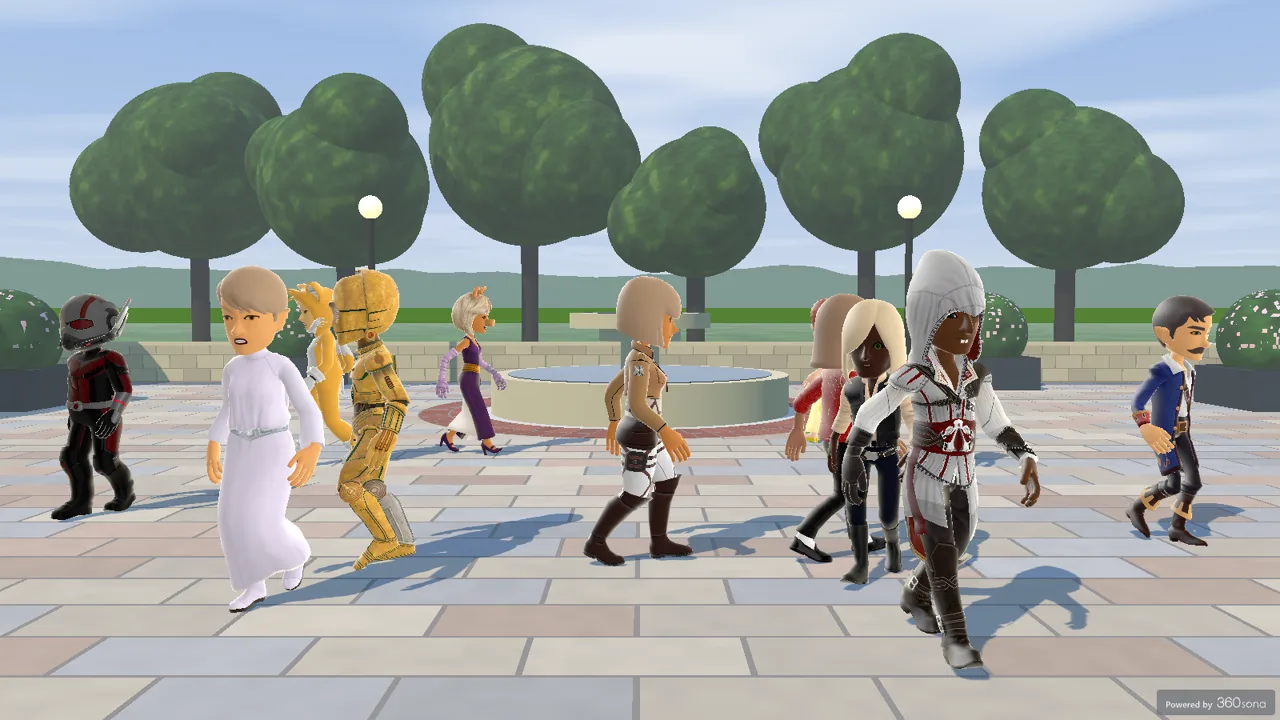
It is the same scene as the plaza starter on every other platform.
Next
- The engine reference lists every node, property, method and signal.
- Credit: the addon shows a small "Powered by 360sona" badge; turn it off (
sona/credit/show) only if you credit 360sona in your credits.
This page as Markdown · All the docs as one file (llms-full.txt)