Tutorial: the plaza demo
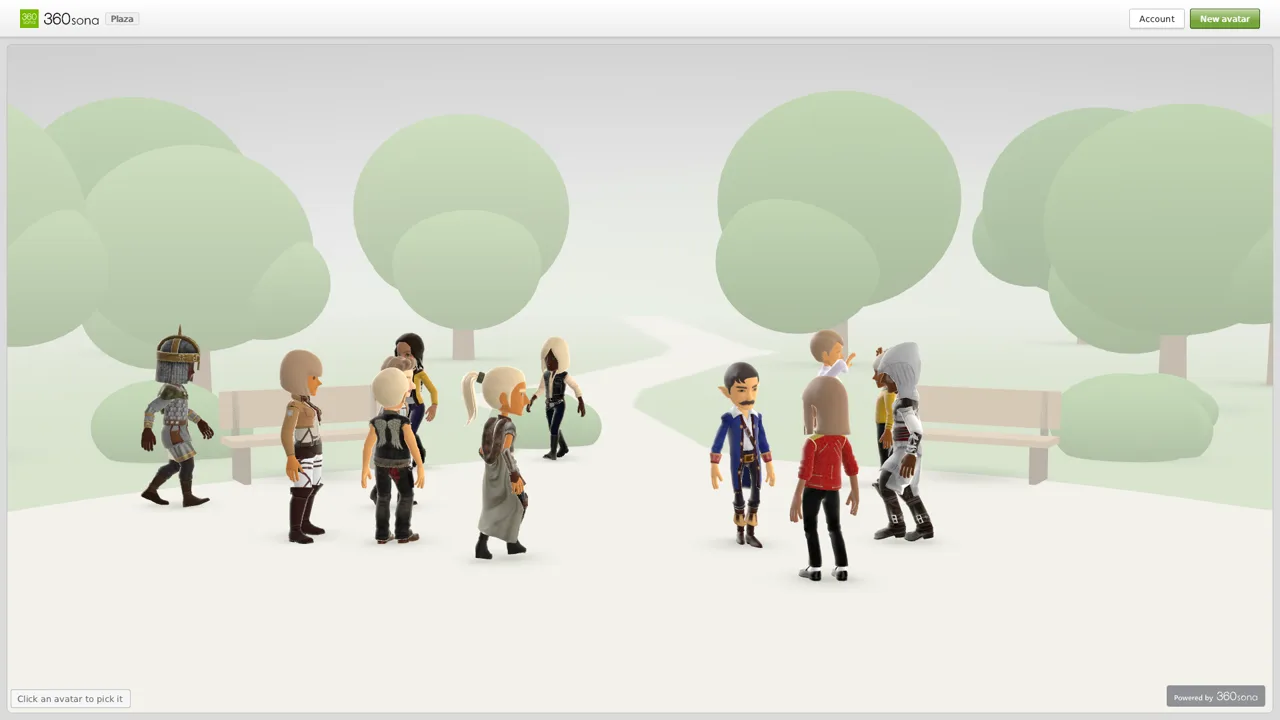
The plaza demo, 360sona Plaza, is the SDK's flagship app: the 360sona editor with a park for its stage, where your avatars walk about, idle, wave, sit on the benches and greet each other. Pick one to see its card, edit it in the drop-in editor, change its outfit, duplicate, rename or delete it, or make a new one, and save to your 360sona account. It is one design in two programs, a C++ app on the native SDK and a web page on the web SDK, and both are short enough to copy from.
Its page, 360sona Plaza, runs it live and has both programs as one project to download, with a README that has the steps below.
| What | Native | Web |
|---|---|---|
| Source | templates/plaza-demo in 360sona-templates. |
web/ in the project |
| Runs on | Windows, Linux and macOS (built from the source) | Any browser with WebGL2 |
| Needs | The core with its GL backend, the editor module, SDL3 and stb_truetype | The web SDK |
| Draws the park with | world.glsl, OpenGL 3.3 |
the same world.glsl, WebGL2 |
1. Open the web demo
- Open https://360sona.com/devs/plaza/. It needs no download and no account: the demo account is kept in the browser's storage, already filled with twelve avatars.
- Click an avatar to see its card; Edit look opens the editor over the park.
2. Build the native demo
- Unpack the templates (getting them) into your SDK download's folder
(
sdk/below), and putstb_truetype.hbeside your build (where it comes from):
tar xzf 360sona-templates.tar.gz -C sdk
- Build
plaza_demo: one C++ program,templates/plaza-demo/main.cpp, with its park (world.h,world.glsl), its screens (ui.h) and its saved account (store.h) beside it. It draws with OpenGL 3.3 in an SDL3 window and links the core and the editor module:
c++ -std=c++17 -O2 -I sdk/include -I . sdk/templates/plaza-demo/main.cpp \
    sdk/templates/plaza-demo/stb_impl.cpp \
  -L sdk/lib -lsona_editor -lsona $(pkg-config --cflags --libs sdl3) \
      -DSONA_LOBBY_CURL -lcurl -lm \
  -Wl,-rpath,sdk/lib -o plaza_demo
On Windows, with SDL3's development files in SDL3\ (from libsdl.org), link winhttp, bcrypt
and ws2_32 in place of libcurl, and keep sona.dll, sona_editor.dll and SDL3.dll beside the program:
cl /std:c++17 /O2 /EHsc /I sdk\include /I . /I SDL3\include `
  sdk\templates\plaza-demo\main.cpp sdk\templates\plaza-demo\stb_impl.cpp `
  sdk\lib\sona_editor.lib sdk\lib\sona.lib SDL3\lib\x64\SDL3.lib `
  ws2_32.lib winhttp.lib bcrypt.lib /Fe:plaza_demo.exe /link /SUBSYSTEM:WINDOWS /ENTRY:mainCRTStartup
- On Linux, put its two fonts,
DejaVuSans.ttfandDejaVuSansMono.ttf, in afontsfolder beside the program (the DejaVu fonts). On Windows and macOS it uses the system's Verdana, and Cascadia Mono, Consolas or Menlo.
3. Run it
plaza_demo --catalogue sona-catalogue.bin --licence sona-licence.json
sona-catalogue.bin is the offline catalogue, data/sona-catalogue.bin in a download asked for with
&catalogue=1 (installing): copy it beside the program. The item files stream
from 360sona; --dir <folder> reads them from a folder of your own. --theme light or
dark picks the editor's theme, --data <folder> where the demo account is saved, --fullscreen the whole
screen.
The demo account opens at once with twelve avatars walking about the park:
4. Use it
| To | Gamepad | Mouse, keyboard, touch |
|---|---|---|
| Pick an avatar | LB and RB to choose, A to pick | Click or tap it |
| Edit its look | Edit look on its card | The same button |
| Make a new avatar | X | New avatar |
| Open the account | Y | Account |
| Go back | B | Esc, or Back |
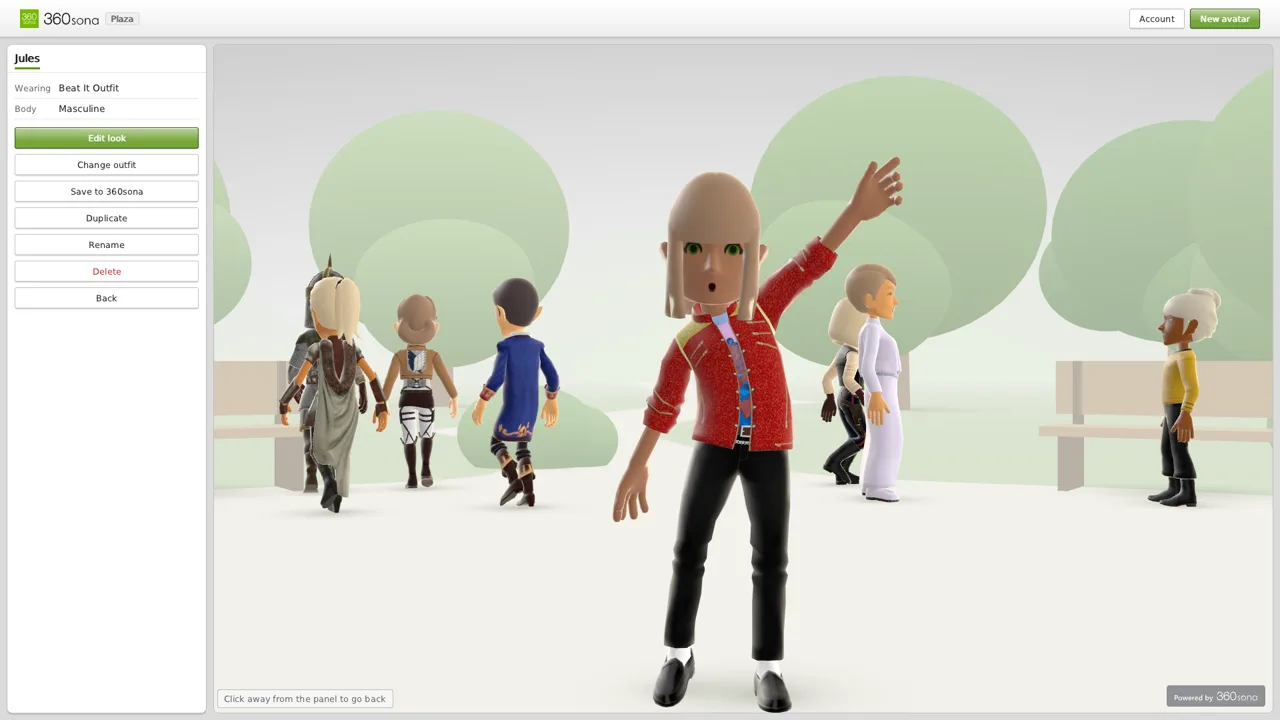
A picked avatar comes to the stage spot with its card: its name, what it wears, and Edit look, Change outfit, Save to 360sona, Duplicate, Rename, Delete and Back.
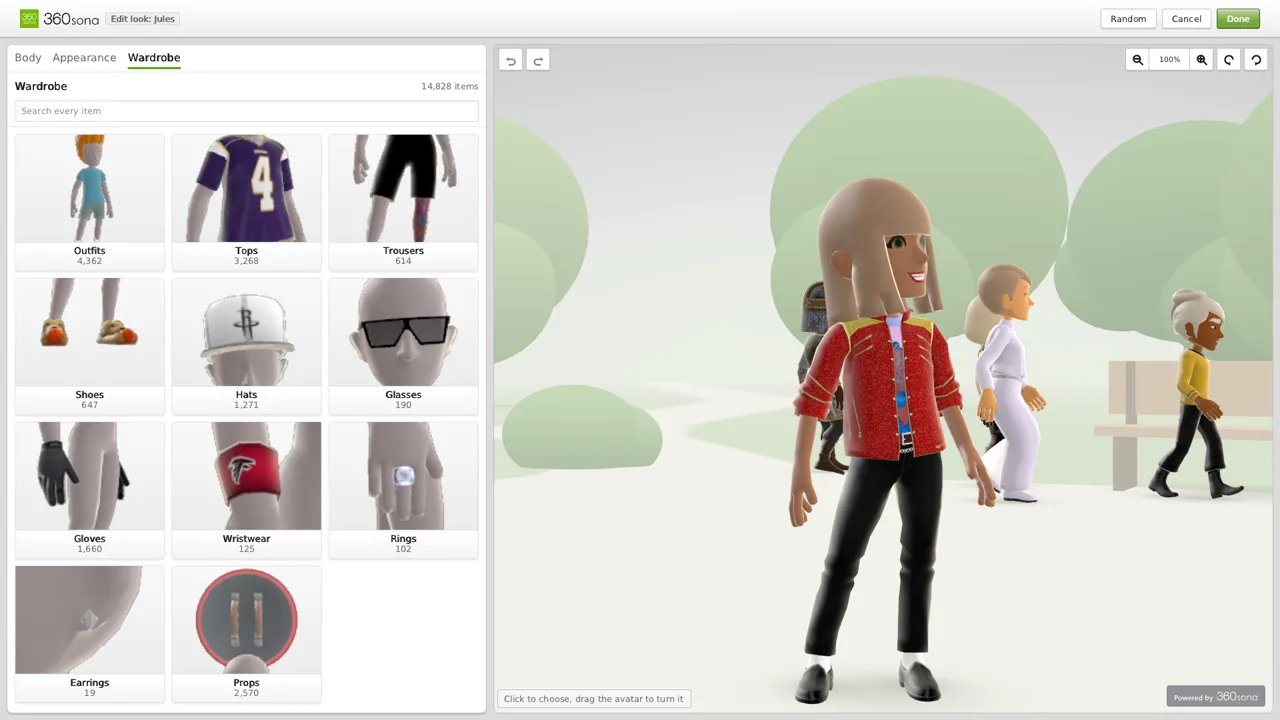
Edit look opens the SDK's drop-in editor, whose panels come in around the avatar; Done puts the new look on the avatar, which goes back to walking.
New avatar starts from the quick creator (eight looks, then four quick changes) or from scratch, then asks for a name. The new avatar walks in along the path.
5. Sign in and save
Sign in with 360sona, on the title screen, in Account, or with Save to 360sona on a card, loads the player's saved
avatars and saves every change back. It is the same flow as the lobby template: OAuth 2.0 with
PKCE over a loopback redirect, the scopes avatar:read and avatar:write, and the password never reaches the app.
- Sign in is offered only where it can finish: at start the demo asks the accounts server whether it knows the app, and greys the button with the reason when it does not.
- A change the account refuses is undone in the plaza and the demo says so, so the plaza never shows what the account does not hold.
6. How it is made
| Part | Native | Web |
|---|---|---|
| The design: colours, camera, park, cast, copy | design.json |
the same file |
| The park the avatars walk in | world.h with world.glsl |
world.js with the same world.glsl |
| The avatars | sona_draw into a texture, laid over the park |
the SDK's canvas over the park's canvas |
| Picking | sona_pick_screen |
an upright capsule per avatar |
| The editor | sona_editor (guide) |
<sona-avatar-editor> (guide) |
| Accounts | store.h: a JSON file, or /sona/v1/slots after sign-in |
localStorage, or the same API |
Nothing in the frame is temporal and the avatars are drawn without bloom, so edges stay sharp while they walk.
7. Script it
--offscreen draws with no window and --script "<step>; <step>; ..." plays steps, then writes state.json to
--out:
plaza_demo --catalogue sona-catalogue.bin --offscreen --size 1920x1080 --out
    shots \
  --script
      "ready; start; wait 2.5; shot plaza; pick 3; wait 2.6; shot card; quit"
| Step | What it does |
|---|---|
ready |
Waits until every avatar is built |
start, reset |
Opens the demo account (reset refills it) |
pick <i>, hover <i> |
Clicks, or points at, account avatar i |
button <label> |
Presses the button with that label |
pad <button> |
A gamepad button: a b x y up down left right lb rb start |
type <text>, erase <n> |
Types, or deletes letters, in the name screen |
settle, wait <s> |
Waits until the editor and account are idle, or for s seconds |
shot <name> |
Writes the frame as <name>.png |
measure <s> |
Times every frame for s seconds |
quit |
Ends the run and writes state.json |
Next
- The bare version of the same scene, on every platform: the plaza starter.
- The parts it is built from: the player editor, picking, sign in with 360sona.
This page as Markdown · All the docs as one file (llms-full.txt)