Tutorial: the C++ starter project
A project from the C++ starter template, made with the sona tool (or SDK Studio's Projects pane, or an agent
through sona-mcp), built and run. The project is the plaza starter in C++: your avatar and eleven others walk about a
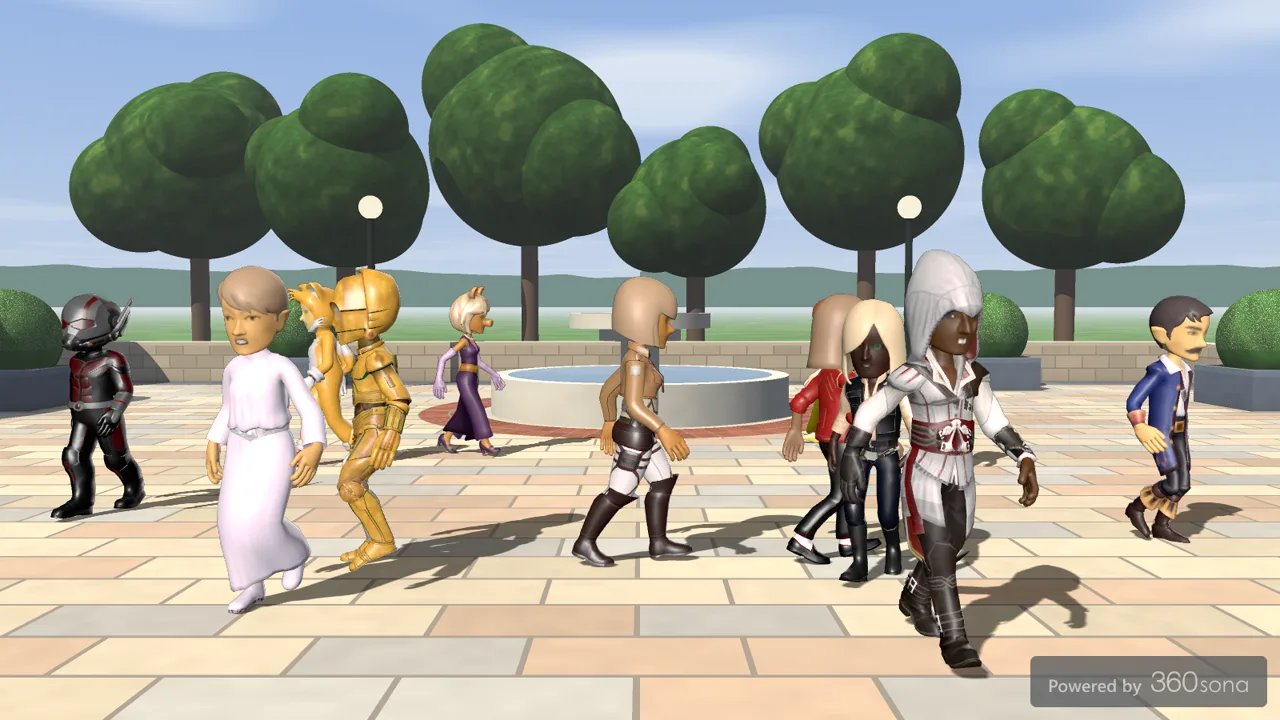
plaza on a headless Vulkan device, with frame stats on stdout and the last frame saved as a picture.
1. Make the project
The sona tool makes it. The tool installs apart from the SDK, from your app's page or
GET /sona/v1/apps/{id}/tools (installing the tools). The project gets a copy of
your licence: the tool takes --licence <file>, else $SONA_LICENCE, else sona-licence.json in the download's
folder named by --sdk sdk (or $SONA_SDK), else ./sona-licence.json.
sona project templates
sona project new my-game --template cpp-starter
| File | What it is |
|---|---|
main.cpp |
The program: open a context, add the walkers, make a headless device and renderer, walk them, save the pictures |
place.h |
The plaza: the host's own world, ray-traced on the CPU, and the light it gives the avatars |
brand.h, logo.png |
360sona's logo for the loading screen |
avatar.b64 |
Your avatar, the first walker (--avatar <file> at sona project new picks another) |
cast.json |
The other walkers: costumes |
vk_min.h |
A headless Vulkan device with no Vulkan SDK |
sona-licence.json |
The licence file from your download |
CMakeLists.txt, Makefile |
The build; make check is the smoke test |
.sona/ |
The project tool's notes and logs |
2. Build and run
cd my-game
make check SONA_RUN_ARGS="--gate"
make check configures and builds with CMake, then runs the program headless for eight seconds (SECONDS=30 for
longer), with SONA_RUN_ARGS on its command line: --gate streams the item files from 360sona, --dir <folder>
reads a folder of your own. By hand:
cmake -S . -B build
cmake --build build
./build/my-game --gate --seconds 8
The last frame, saved as a picture:
It needs CMake 3.16 or later, a C++17 compiler and a Vulkan driver; --cpu draws on a CPU Vulkan device where there
is no GPU. sona project build my-game and sona project run my-game do the same from the tool, and write their logs
to .sona/.
3. What it prints
One JSON object per line:
| Line | When | Fields |
|---|---|---|
frame_stats |
Once a second | frames, frame_ms_mean, frame_ms_max, cpu_ms_mean, avatars, ready, draw_calls, gpu_mb, cpu_mb |
done |
At the end | frames, avatars, ready, walked, device, screenshot |
error |
When something failed (exit status 1) | message |
frame_ms is one sona_update plus one sona_snapshot (a draw and a read back); cpu_ms is the time inside
sona_update. The exit status is 0 when every avatar became ready.
4. Change it
The frame loop is in main.cpp; the options are at the top of its main:
| Option | Meaning | Default |
|---|---|---|
--dir <folder> (up to four), --gate |
The asset sources: folders of avatar files, or the 360sona gate | none |
--licence <file> |
Your licence | sona-licence.json |
--avatar <file> |
Your avatar, the first walker, as base64 | avatar.b64 |
--cast <file> |
The other walkers | cast.json |
--avatars <n> |
How many walk, 1 to 12 | 12 |
--clip <stock clip> |
The clip they play | walk_forward |
--seconds <n> |
How long they walk | 8 |
--size <W>x<H> |
The picture's size | 1600x900 |
--out, --loading, --layer |
The last frame, the loading screen, the avatars alone | screenshot.png, loading.png, none |
--cpu |
Draw on a CPU Vulkan device | off |
- Replace
avatar.b64to walk someone else in, or editcast.jsonfor the others. - Change the tables at the top of
place.hto change the plaza. - A game draws into its own swapchain image with
sona_drawinstead ofsona_snapshot, which reads every frame back (concepts). - Keep the "Powered by 360sona" badge the snapshot draws in the corner, or show the credit elsewhere and pass
SONA_DRAW_NO_CREDIT.
Next
- The plaza starter: the same scene on every other platform.
- The C++ tutorial: one avatar through
sona.hpp, step by step. - The CLI and the Studio: every project command.
This page as Markdown · All the docs as one file (llms-full.txt)