Tutorial: the web crowd template
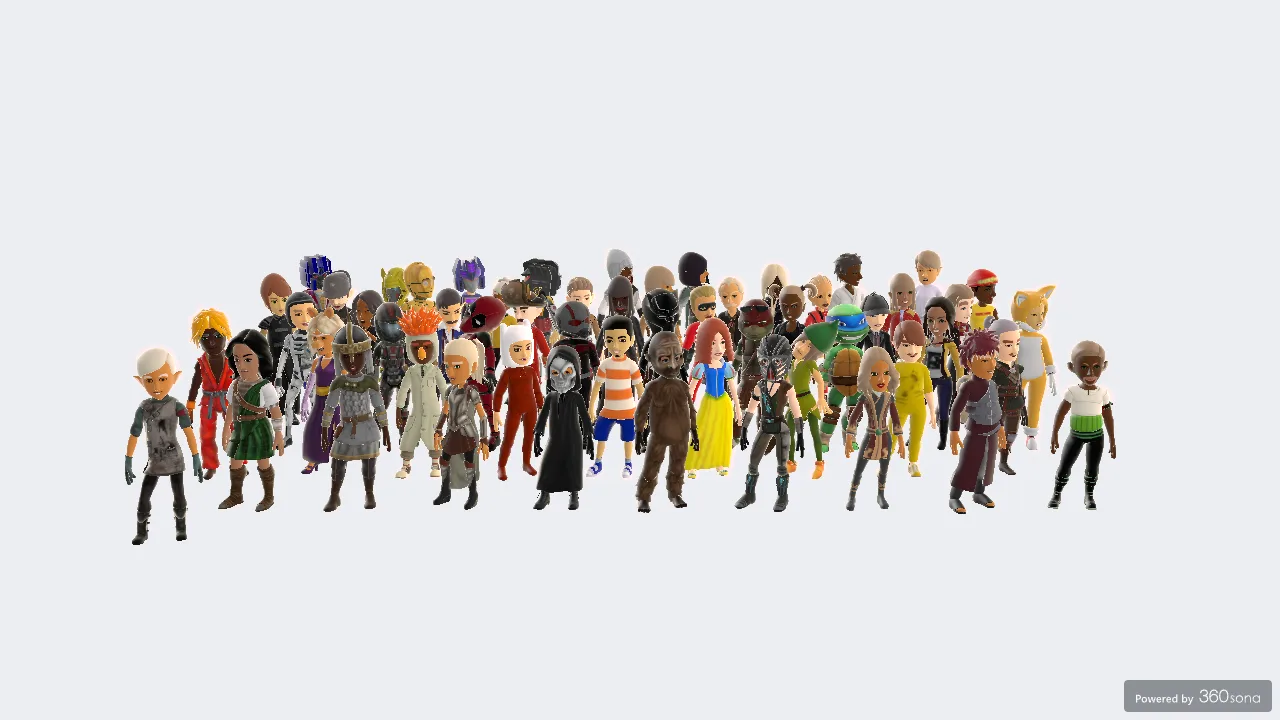
The web crowd template is one HTML page that puts a thousand Xbox 360 avatars in one canvas, no two the same, each in a costume from a list of 506, standing in a park. It uses the web SDK and nothing else.
crowd.html, the template itself, running here.
What is in it
| File | What it is |
|---|---|
examples/crowd.html |
The page, beside sona-renderer.js in the web download |
examples/crowd-costumes.json |
The costumes: for each one and each body, the ids to wear, the costume first and then its helmet, mask or gloves; and same, the costumes that are one character in several outfits |
Keep the two files together: without the list the page says so and draws nobody.
Each avatar is someone of their own: a face, hair, skin and build picked by the seed, in one of the costumes. A costume is worn about twice, on the other body the second time where it has both, and no character stands near itself. The items stream from 360sona, so the page needs only your app id.
1. Run it
Unzip the web download into web-sdk/, serve that folder over HTTP and open the page:
cd web-sdk && python3 -m http.server 8080
Then open http:/. Page settings go in the address:
| Setting | What it does |
|---|---|
app |
Your app id, registered for this site |
n |
How many avatars, 1 to 1000 (1000 by default, 250 on a phone-sized screen) |
seed |
Which crowd: the same seed makes the same crowd |
The Avatars list changes the count and New crowd makes another one. The line beside them says how many are there.
2. Make the renderer
The renderer is made once for the canvas, with room for the whole crowd:
const sona = await SonaRenderer.create({
  canvas: $('view'),
  appId: q.get('app') || (APP.includes('{{') ? undefined : APP),
  host: q.get('host') || undefined,
  renderer: q.get('renderer') || 'auto',
  maxAvatars: 1024,
  // four times the default: more of each frame goes to building while the crowd arrives
  buildBudgetMs: 24,
});
3. Dress each avatar
A manifest is made for each avatar from a bare sample. SonaRenderer.wear puts on the face parts and the hair, the
build and colours are written into the manifest, and last come the costume's ids:
for (const id of ids) m = SonaRenderer.wear(m, id);
return { manifest: m, build };
4. Add them
Each avatar is one call to sona.add, with its place, its turn towards the camera and a random start in its standing
clip, so the crowd does not move in step:
for (const f of crowd) f.avatar = sona.add(f.manifest, { position: f.at,
    turn: f.turn, clip: f.clip, startAt: 'random' });
Every avatar's ready promise settles when it is drawn or has failed, and the page waits for all of them:
await Promise.allSettled(mob.map((f) => f.avatar.ready));
They appear as they are built, the nearest first. On a renderer too slow for that (four frames in a row over a
threshold of 150 ms, a software renderer for one) the ones still building wait with setVisible(false) and step in
together at the end, so the drawing does not hold up the building. Once everyone is there, while frames run long, the farthest ranks stop
moving with stop(), down to the front forty.
5. Fit the picture
The camera stands back until everyone fits the picture, whatever its shape. The page fits again when the window changes:
addEventListener('resize',
    () => { clearTimeout(resized); resized = setTimeout(() => { if (folk.length) fit(0.4); }, 150); });
The park is drawn in a 2D canvas under the avatars' canvas, from the same camera, with a soft shade under each avatar in a canvas between the two.
6. Make it yours
- Put your players' avatars in place of the dressed samples:
sona.addtakes any manifest, and a gamertag lookup gives one. - Change the list:
crowd-costumes.jsonholds item ids, andsona.wardrobe()lists every item with its name. - Lay the crowd out in your own scene:
positionandturnare all the page sets. Draw your own world in the canvas under the avatars' canvas, aspark()does. - Keep the "Powered by 360sona" badge the renderer draws in the corner of the canvas.
Next
- Web tutorial: one avatar on a page, step by step.
- Crowds: what makes a big crowd cheap, native and web.
- Templates and starters: every template and what it shows.
This page as Markdown · All the docs as one file (llms-full.txt)